Always Have an Exit Strategy: dbsafe Automatic Rollback Plans
Before you ALTER, know exactly how to undo it
You’ve planned the schema change. You’ve verified the algorithm. You’ve scheduled the maintenance window. And then, fifteen minutes after the ALTER TABLE commits, the application starts throwing errors. The column type is wrong. The index breaks a query. You need to undo it — immediately, under pressure, while your on-call phone is ringing.
Do you have the rollback SQL written down?
Every schema change has a mirror operation. ADD COLUMN → DROP COLUMN. ADD INDEX → DROP INDEX. dbsafe generates that rollback SQL automatically as part of every plan output. Before you touch production, you already know the undo operation — and whether it’s actually reversible at all.
Related: This is part of the dbsafe series. Zero-Downtime Schema Changes with INSTANT DDL covers metadata-only operations that take milliseconds. When MySQL Rebuilds Your Table: Understanding COPY Algorithm DDL covers the dangerous end — full table rebuilds, exclusive locks, and when to use gh-ost or pt-osc.
The Two Kinds of Rollback
dbsafe’s rollback plan section covers two fundamentally different scenarios:
Structural rollbacks — operations where the inverse SQL is mechanically clean. Adding a column can be undone by dropping it. Adding an index can be undone by dropping it. These are reversible at the SQL level.
Data destruction — operations where there is no SQL rollback. DROP COLUMN permanently destroys the values stored in that column. A DROP COLUMN → ADD COLUMN pair restores the column definition but not the data. dbsafe surfaces a warning rather than a misleading rollback command.
Knowing which scenario you’re in — before you run the change — is what makes the difference between a prepared runbook and an incident.
ADD COLUMN: Clean Rollback
The simplest rollback case. Adding a column has a clean mirror: drop the same column. The schema returns to its original state.
dbsafe plan "ALTER TABLE orders ADD COLUMN fulfillment_notes TEXT"
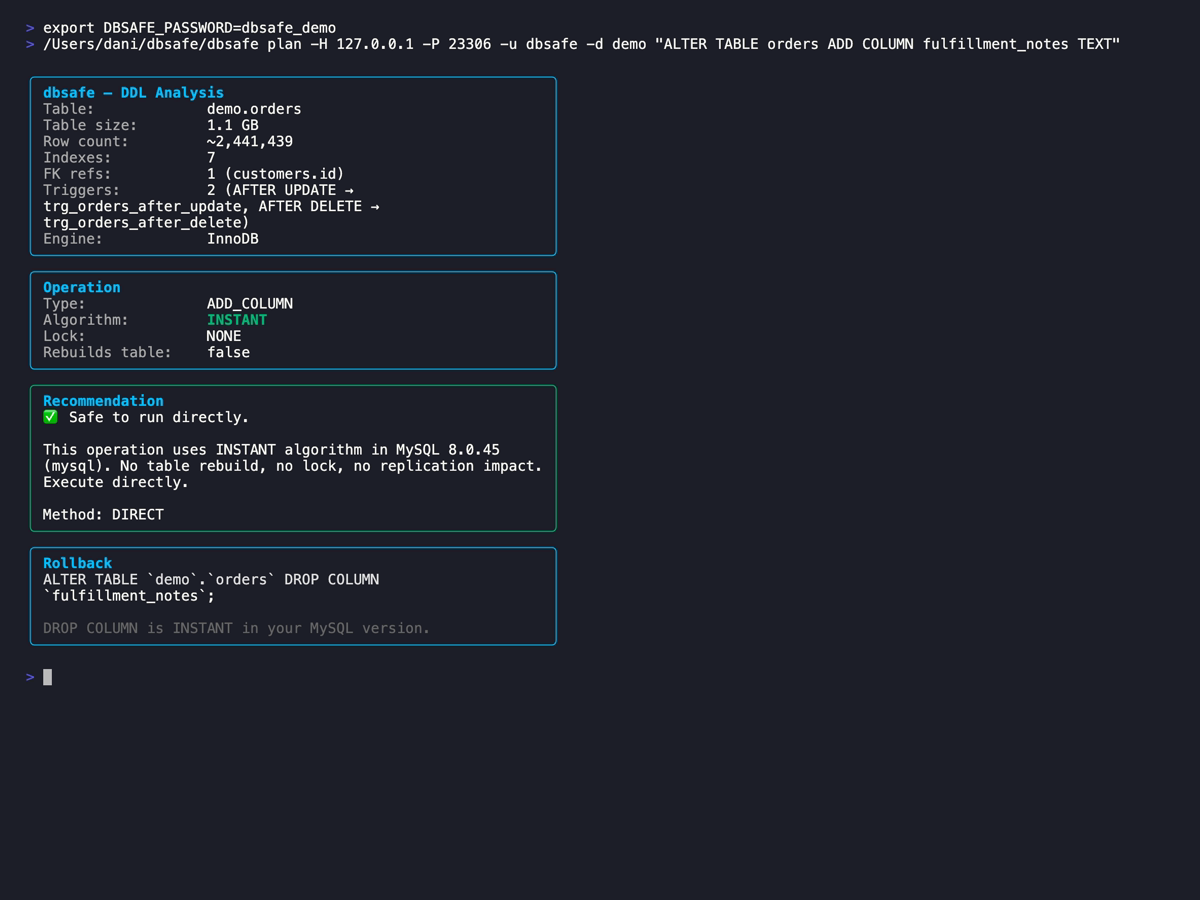
dbsafe identifies this as INSTANT — a metadata-only change, no table rebuild, milliseconds on any table size. The rollback plan at the bottom of the report shows exactly what to run to undo it:
ALTER TABLE orders DROP COLUMN fulfillment_notes;
On MySQL 8.0.29+, that rollback is also INSTANT. The column is marked as dropped in the InnoDB data dictionary and the change commits in milliseconds — no rebuild, no rows touched.
One important caveat: the structural rollback only works cleanly if no data has been written to the column yet. If the application started populating fulfillment_notes between the ALTER TABLE and the rollback, that data disappears when the column is dropped. The SQL is correct, but it’s a schema rollback, not a data rollback. Backups cover the data; the rollback SQL covers the structure.
ADD INDEX: Clean Rollback
Index additions are even cleaner to roll back. ADD INDEX → DROP INDEX, with zero data loss. Indexes are derived structures built from existing row data — dropping one never removes a single byte of actual stored data.
dbsafe plan "ALTER TABLE orders ADD INDEX idx_total_amount (total_amount)"
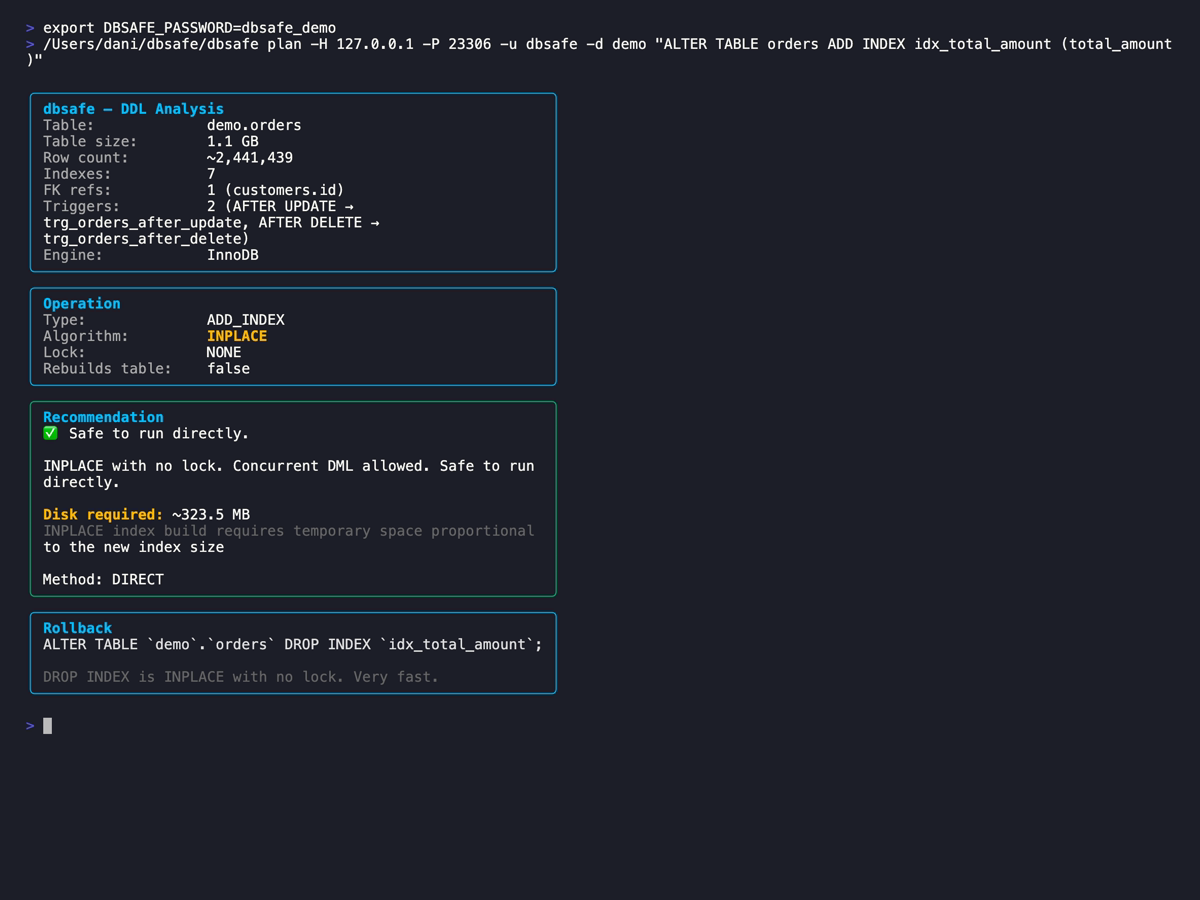
The rollback plan shows:
ALTER TABLE orders DROP INDEX idx_total_amount;
The forward operation is INPLACE — MySQL reads all rows to build the index structure without creating a shadow copy of the table. The rollback is faster: dropping an index is a metadata change that doesn’t touch row data at all. If you realize the new index is causing query planner issues or unexpected lock contention, the DROP INDEX rollback is safe to run immediately under load.
DROP COLUMN: Data Is Gone
This is where the rollback plan becomes a warning.
dbsafe plan "ALTER TABLE orders DROP COLUMN fulfillment_notes"
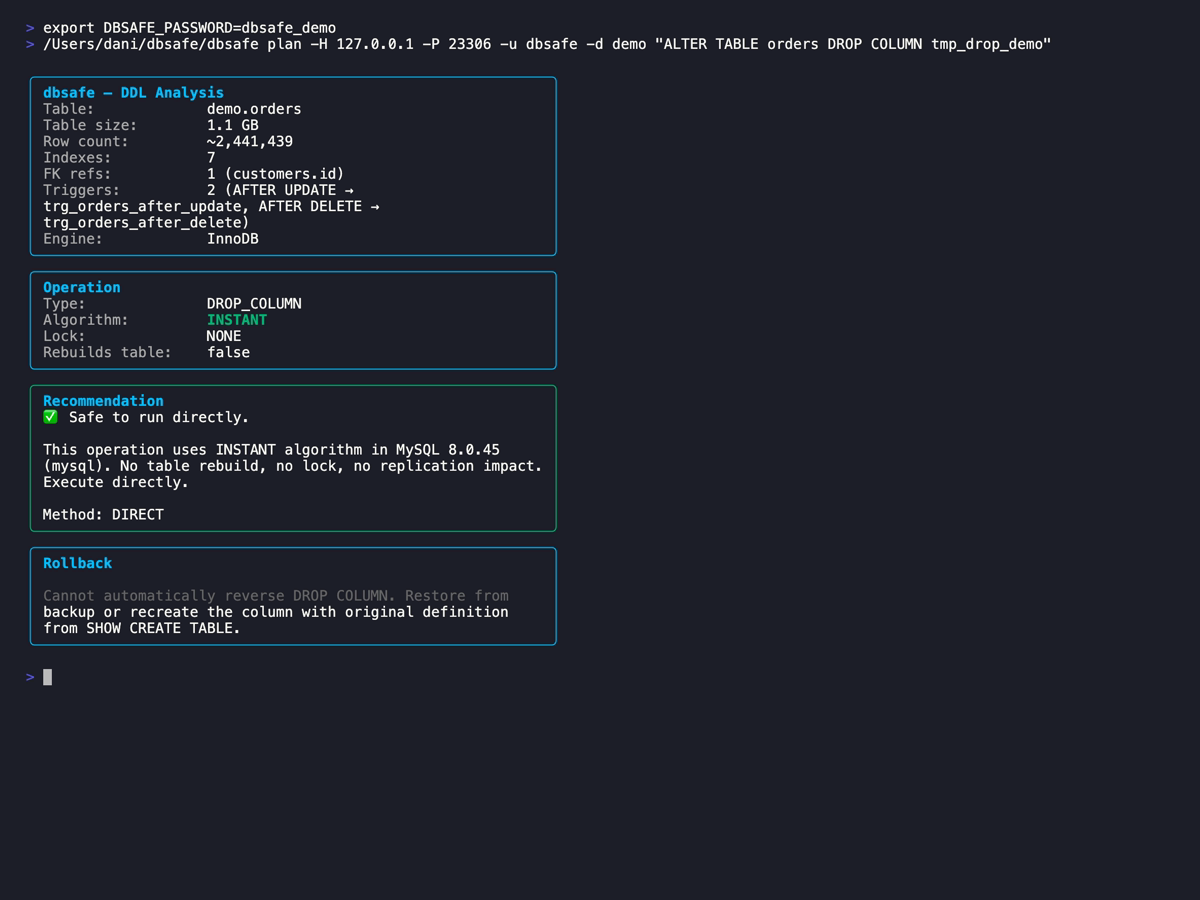
dbsafe does not generate ADD COLUMN fulfillment_notes TEXT as the rollback. That SQL would restore the column definition but not the data stored in it across all existing rows. A misleading rollback is worse than no rollback — it creates the false impression that you can recover something you can’t.
Instead, the rollback section surfaces a clear warning: this operation permanently destroys data. After the commit, the only recovery path is restoring from a backup.
Before running any DROP COLUMN on a production table:
- Confirm the column is genuinely unused — check application code, ORM models, stored procedures, and views
- Verify you have a recent backup and you know how to restore from it
- Consider a deprecation buffer: rename the column to
_col_deprecated_YYYYMMDDand wait two full deployment cycles before dropping. If something breaks, you rename it back in milliseconds - On MySQL 8.0.29+, the physical bytes stay on disk until the next rebuild (
OPTIMIZE TABLEor a COPY-algorithm ALTER) — but they’re completely inaccessible to MySQL and cannot be queried
The rename strategy is underused. It costs nothing operationally — a RENAME COLUMN is INSTANT on MySQL 8.0.28+ — and it buys you weeks of confidence before the irreversible step.
MySQL 8.0.29+: INSTANT Drop
On MySQL 8.0.29 or newer, DROP COLUMN executes as INSTANT DDL. The column is marked as dropped in the InnoDB data dictionary and the change commits in milliseconds, regardless of table size (with limited exceptions: ROW_FORMAT=COMPRESSED tables, tables with a FULLTEXT index, and tables that have exhausted the 64 INSTANT row-version limit).
The data destruction caveat is unchanged. INSTANT execution means the structural change is fast — it doesn’t mean the data is preserved or recoverable. What it does change for the rollback picture:
- No long-running ALTER to interrupt — with the COPY algorithm, the data-copy phase can take minutes or hours, giving you a window to kill the query before the final table swap. With INSTANT, the commit is atomic and immediate. There is no window to intervene after you press Enter.
- Physical bytes remain until the next rebuild — the column data is invisible to MySQL and cannot be accessed via SQL. A full table rebuild — via
OPTIMIZE TABLE,ALTER TABLE ... FORCE, orALTER TABLE ... ENGINE=InnoDB— is the only way to reclaim the disk space.
dbsafe surfaces a note when the DROP COLUMN will execute as INSTANT, so you can set correct expectations for both timing and the permanence of the change.
Rollback Plans in Practice
The rollback section is designed for one specific use case: runbook preparation.
When you’re preparing a change for a production deployment window, capture both the forward SQL and the rollback SQL in your runbook before the window opens. During the change, if something goes wrong, you paste from a document you reviewed hours earlier — not SQL you’re writing under pressure while the on-call pager fires.
The workflow:
- Write your
ALTER TABLEstatement - Run
dbsafe planagainst your production server or a production-scale replica - Copy the rollback SQL into your runbook alongside the forward operation
- Note the rollback category: structural (reversible) or destructive (backup required)
- Execute the forward change during the window
- If rollback needed: paste and run the rollback SQL immediately
For COPY-algorithm operations executed via gh-ost or pt-online-schema-change, the rollback window is wider. Both tools maintain the original table until the final cutover: gh-ost keeps the _orders_gho shadow table, pt-osc keeps _orders_new. Aborting before cutover leaves the original table completely untouched — the rollback is just stopping the tool. After cutover, you’re in the same position as a direct ALTER, and the dbsafe rollback SQL applies.
Related: After a schema change rollback, monitor for InnoDB mutex contention — especially if the change involved a heavily-written table. See Contention in MySQL InnoDB for how to read the
SEMAPHORESsection ofSHOW ENGINE INNODB STATUSand interpret elevated wait counts after DDL.
Summary
- dbsafe generates rollback SQL automatically for every
ALTER TABLEplan. It’s included in the standard output, no extra flags needed. - ADD COLUMN and ADD INDEX have clean structural rollbacks — drop the same column or index. No data loss, and the rollback operation is often faster than the forward operation.
- DROP COLUMN is irreversible — dbsafe shows a data loss warning instead of misleading rollback SQL. The only real recovery is a backup.
- MySQL 8.0.29+ makes DROP COLUMN INSTANT — milliseconds, but the data destruction is still permanent. No window to intervene after commit.
- Capture rollback SQL in your runbook before the change window — not while the incident is happening.
Happy (safe) schema changes!
References
MySQL Official Documentation:
- ALTER TABLE Statement — MySQL 8.0
- Online DDL Operations — MySQL 8.0
- InnoDB and Online DDL — MySQL 8.0
Tools:
- dbsafe — GitHub Repository
- gh-ost — GitHub’s Online Schema Migration Tool
- pt-online-schema-change — Percona Toolkit
Related Posts:

Daniel Guzman Burgos
Colombia
Related Posts

PostgreSQL Internals for the MySQL DBA
You already know how a database works. This is about how a different database works.
March 31, 2026
The Claude Code Engineer
Ship more, type less
March 08, 2026
dbsafe in the Cloud: Safe Schema Changes on AWS Aurora and RDS
TLS connections, Aurora topology detection, and why gh-ost needs extra work here
March 06, 2026
Comments