Introducing dbsafe: Know Before You ALTER
A tool that analyzes MySQL schema changes before you run them
You’ve probably been there: running ALTER TABLE users ADD COLUMN email VARCHAR(255) on a production table, expecting it to take a few seconds, and watching it lock the table for 20 minutes instead. Or spending an hour reading MySQL documentation trying to figure out if your MODIFY COLUMN will use INSTANT DDL or rebuild the entire table.
The problem with MySQL’s ALTER TABLE is that you don’t know what algorithm it will use, what locks it will take, or how long it will run until you actually execute it. By then, if you guessed wrong, your application is already timing out.
The Problem: ALTER TABLE is a Black Box
When planning a schema change, these are the questions you need answered:
- Will it use INSTANT, INPLACE, or COPY algorithm?
- What locks will it take? Can the table still handle reads/writes?
- How long will it take on a table with 500 million rows?
- Will it work differently on MySQL 8.0.12 vs 8.0.29?
- What about my Galera cluster? Will it block all nodes in TOI mode?
- Can I roll it back if something goes wrong?
- Should I use gh-ost or pt-online-schema-change instead?
You can test on staging, but staging never has production-scale data. You can read the documentation, but you still need to mentally map your MySQL version, your table structure, and your specific ALTER syntax to figure out what will happen.
There should be a tool that just tells you.
Enter dbsafe
dbsafe is a command-line tool that connects to your MySQL server, analyzes your DDL or DML statement without running it, and tells you exactly what will happen.
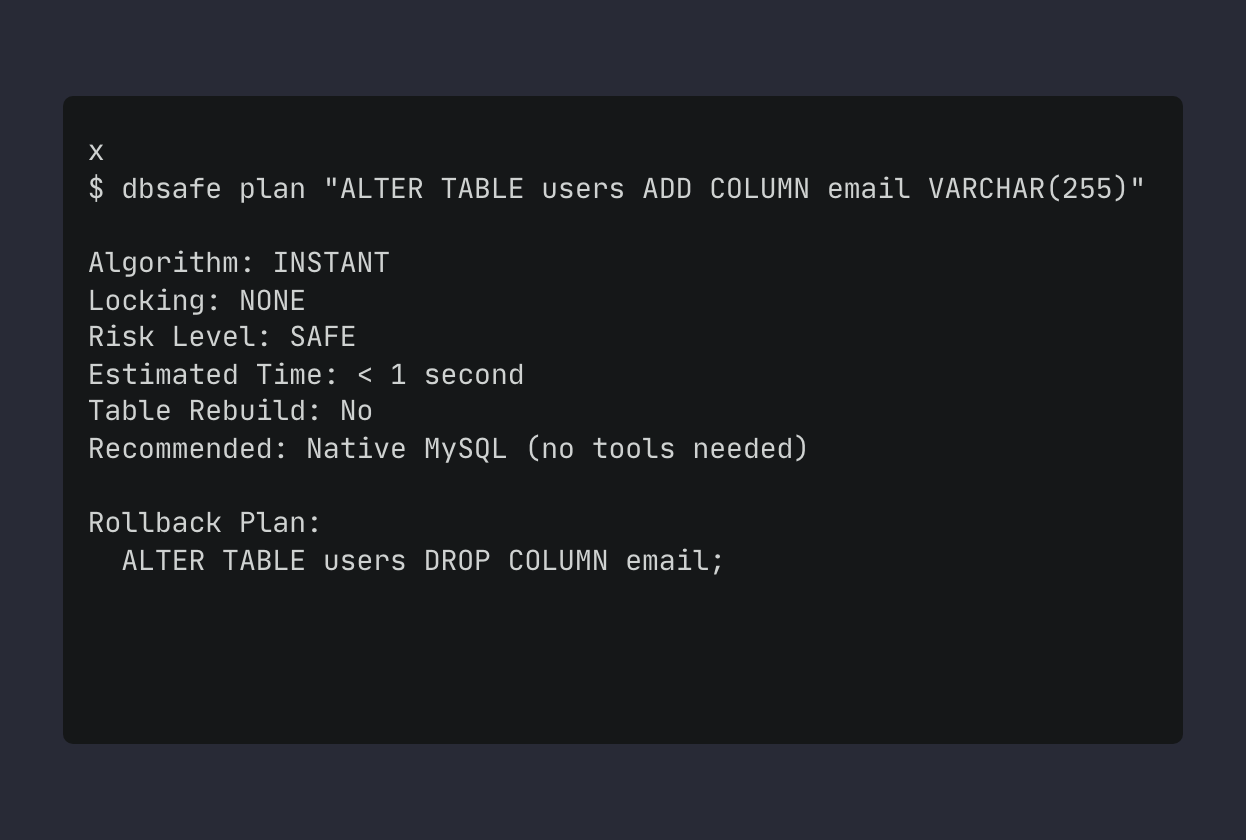
It’s read-only analysis. It doesn’t modify anything. It just tells you what MySQL would do if you ran that statement.
The Same Statement, Different Outcomes
Here’s what makes schema changes tricky: similar-looking statements can behave completely differently.
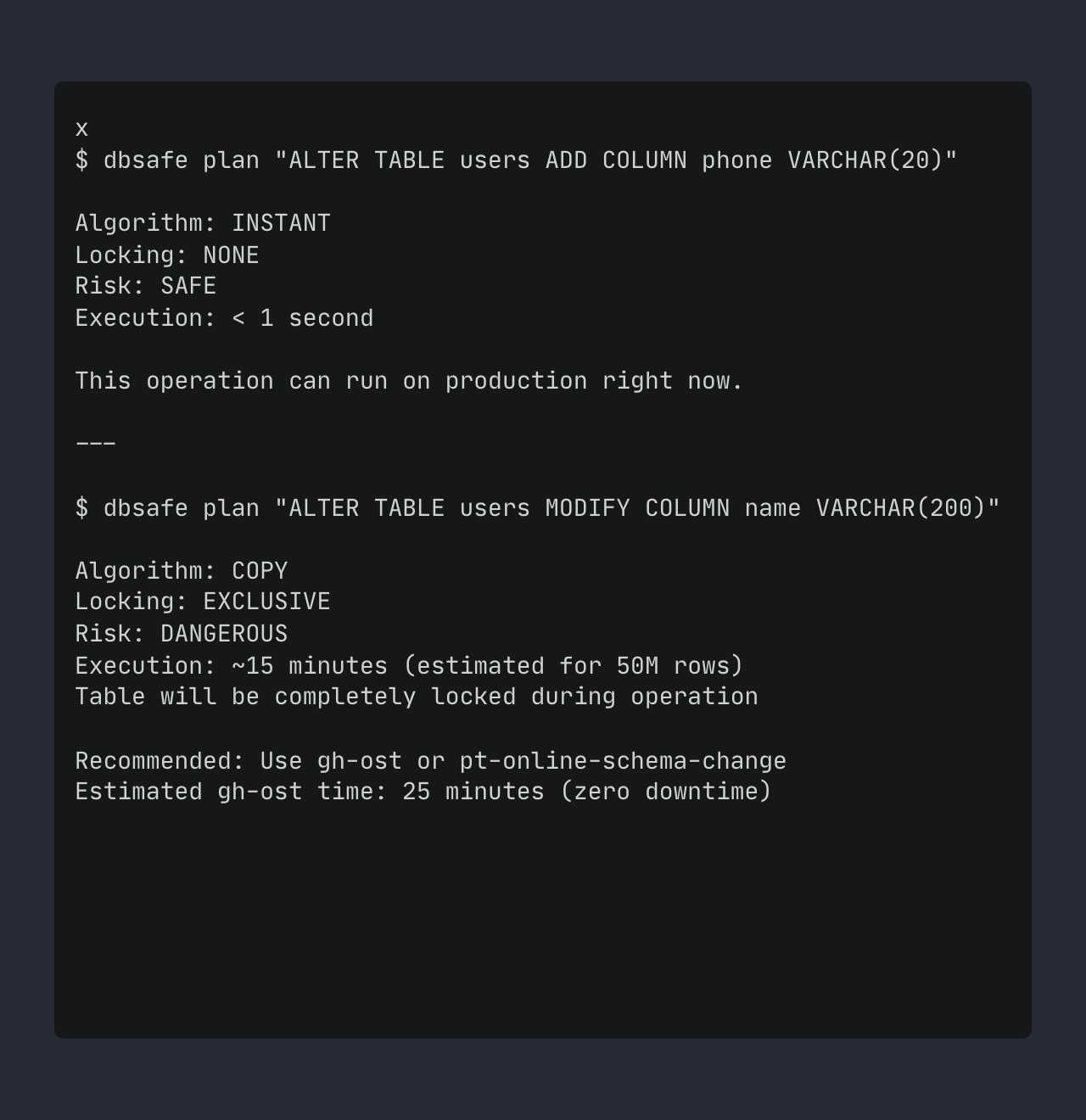
The first one is instant, no locks, safe for production. The second one rebuilds the entire table with an exclusive lock (COPY algorithm creates a new table and copies all rows). You need to know which is which before you run it.
Topology Detection
If you’re running Percona XtraDB Cluster, dbsafe detects it and adjusts its analysis:
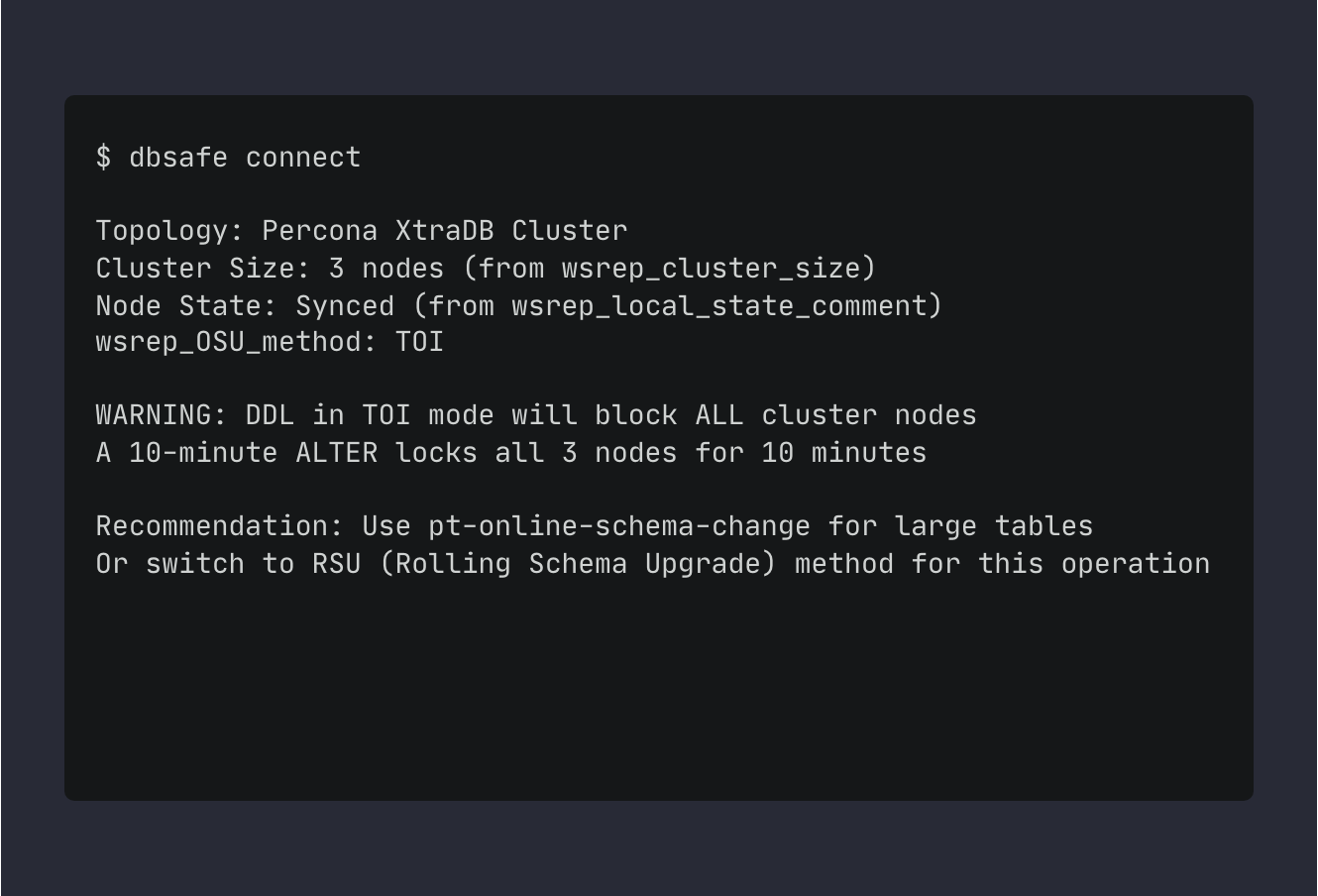
In TOI mode, DDL locks the entire cluster for the duration of the operation - all nodes are blocked from accepting writes. Cluster detection uses wsrep status variables. For large tables, use pt-online-schema-change or RSU method.
The same ALTER that’s safe on standalone MySQL can block your entire cluster for minutes in TOI (Total Order Isolation) mode. dbsafe detects:
- Galera/PXC clusters (wsrep status variables)
Related: For load-testing PXC clusters with ProxySQL read/write split, see How to Test ProxySQL Read/Write Split with sysbench.
- MySQL Group Replication (performance_schema.replication_group_members)
- Async replication topologies (SHOW REPLICA STATUS)
- Semi-sync replication
And adjusts its risk assessment and recommendations accordingly.
DML Analysis
dbsafe also analyzes DELETE and UPDATE statements:
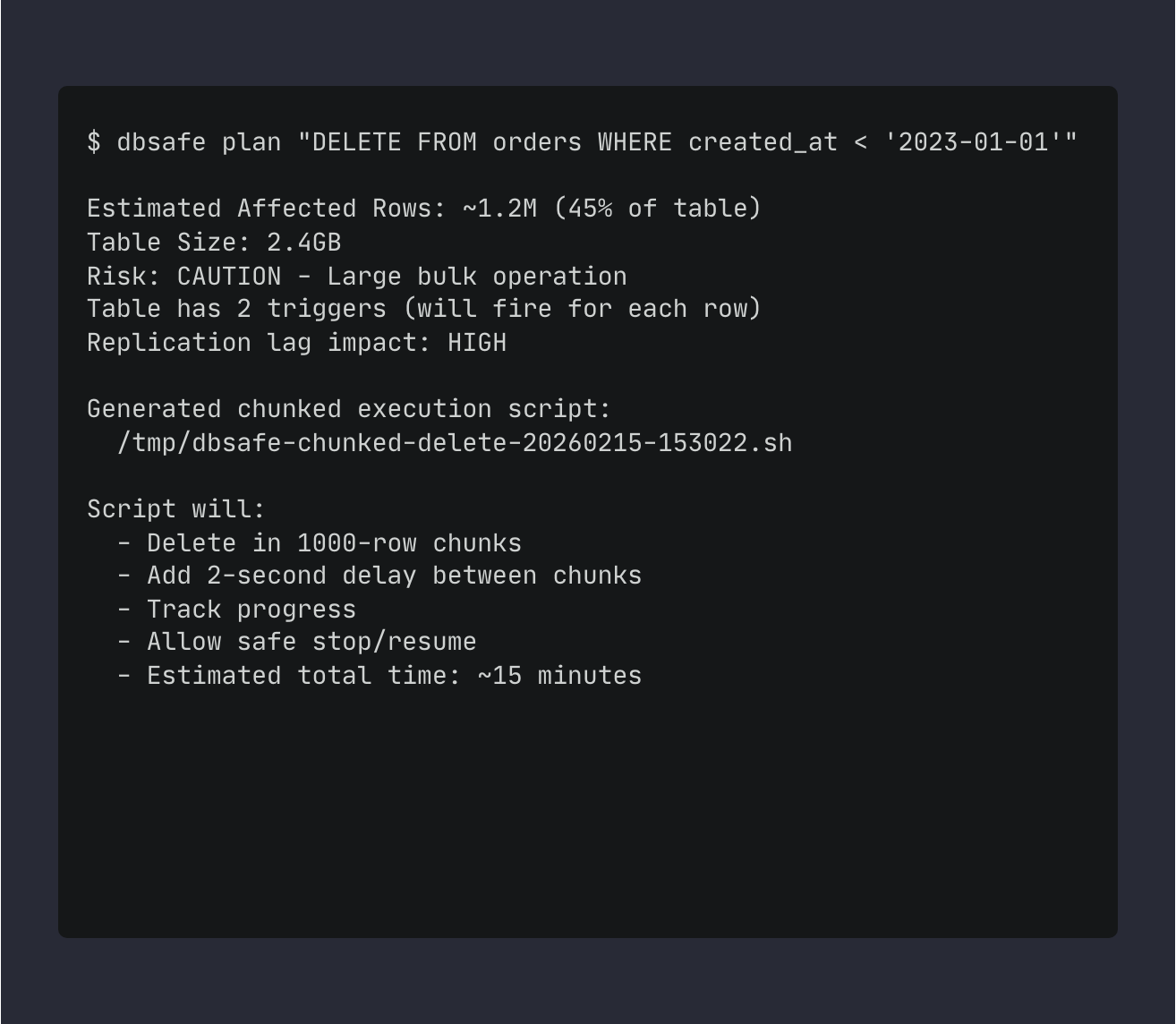
It uses EXPLAIN to estimate affected rows, checks for triggers, and generates a chunked execution script for large operations. The script uses LIMIT with SLEEP() between batches to avoid replication lag and long-running transactions.
Version-Specific Features
MySQL 8.0.12 introduced INSTANT ADD COLUMN for trailing positions. MySQL 8.0.29 extended it to any position and added INSTANT DROP COLUMN. dbsafe detects your MySQL version and tells you what’s supported.
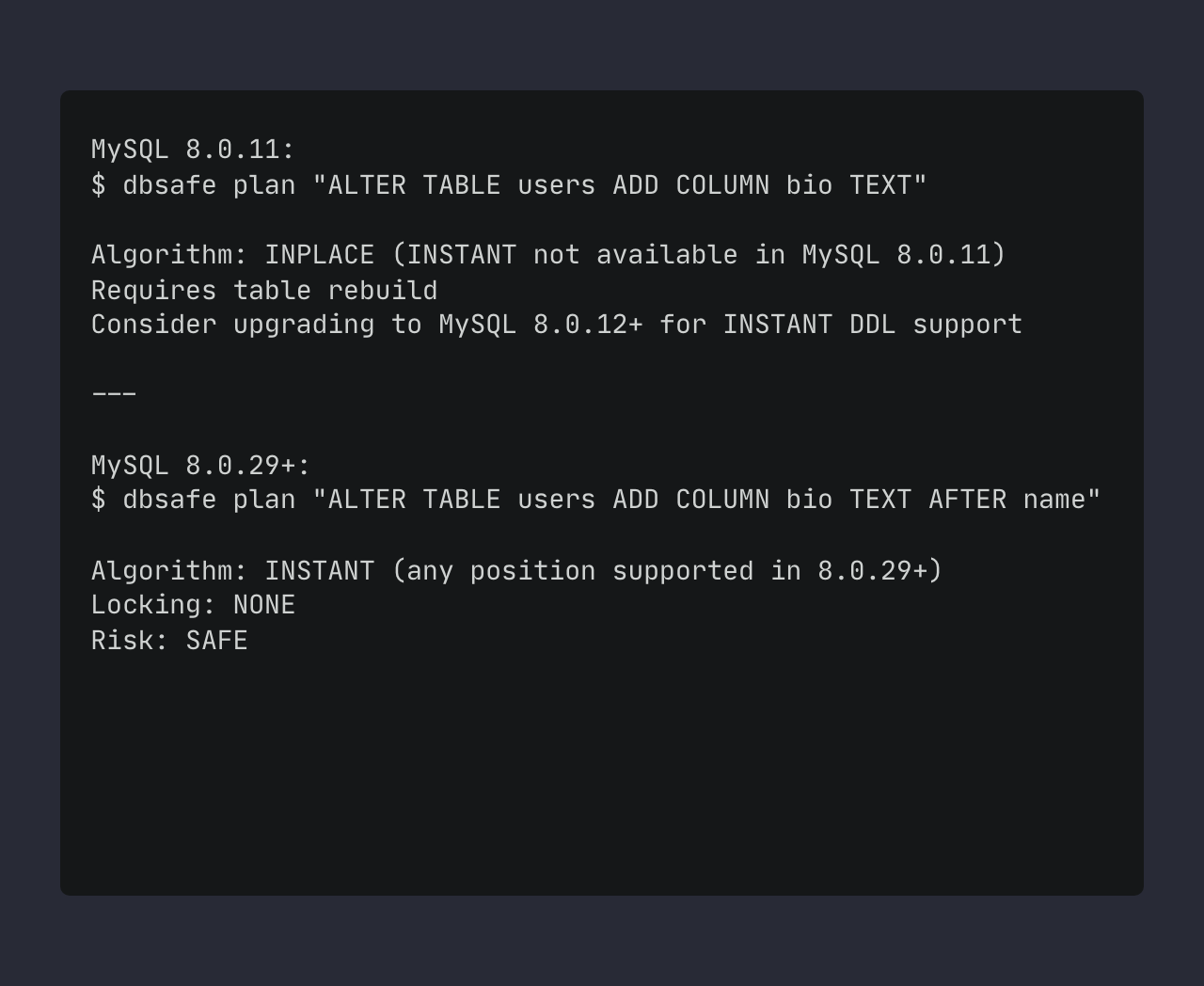
Same statement, different behavior depending on version. You need to know what your specific MySQL version supports.
Features
Read-only analysis - Connects to your database, reads metadata, never modifies data
Topology detection - Detects Galera/PXC, Group Replication, async replication, adjusts recommendations
Version-aware - Knows feature differences between MySQL 8.0.12, 8.0.29, 8.4 LTS, and Percona variants
Rollback plans - Generates undo SQL for every DDL operation
DML analysis - Analyzes DELETE/UPDATE statements, generates chunked execution scripts
Multiple output formats - Text (colored), Plain (no colors), JSON (for automation), Markdown
Table metadata - Shows table size, row count, indexes, foreign keys, triggers
Tool recommendations - Tells you when to use gh-ost, pt-online-schema-change, or native MySQL
CI/CD integration - JSON output, exit codes for pipeline automation
Requirements
- MySQL 8.0.x or 8.4 LTS (including Percona Server variants, XtraDB Cluster, Group Replication)
- MySQL 5.7 and MariaDB are NOT supported
- Read-only MySQL user with SELECT, PROCESS, and REPLICATION CLIENT privileges
Installation
# Linux x86_64
VERSION=0.2.0
curl -L https://github.com/nethalo/dbsafe/releases/download/v${VERSION}/dbsafe_${VERSION}_linux_amd64.tar.gz | tar xz
sudo mv dbsafe /usr/local/bin/

# macOS Apple Silicon
VERSION=0.2.0
curl -L https://github.com/nethalo/dbsafe/releases/download/v${VERSION}/dbsafe_${VERSION}_darwin_arm64.tar.gz | tar xz
sudo mv dbsafe /usr/local/bin/

# Create MySQL user for dbsafe (read-only)
mysql -u root -p << 'SQL'
CREATE USER 'dbsafe'@'%' IDENTIFIED BY 'your_password';
GRANT SELECT, PROCESS, REPLICATION CLIENT ON *.* TO 'dbsafe'@'%';
SQL

# Setup configuration
dbsafe config init

# Test connection
dbsafe connect
Quick Start
Create a test database:
CREATE DATABASE dbsafe_demo;
USE dbsafe_demo;
CREATE TABLE products (
  id INT PRIMARY KEY AUTO_INCREMENT,
  name VARCHAR(100),
  price DECIMAL(10,2)
) ENGINE=InnoDB;
Test a safe change (add -p to be prompted for password):
dbsafe plan "ALTER TABLE products ADD COLUMN description TEXT"
Output shows INSTANT algorithm, no locks, safe for production.
Test a dangerous change:
dbsafe plan "ALTER TABLE products MODIFY COLUMN name VARCHAR(255)"
Output shows COPY algorithm, exclusive locks, recommendation to use gh-ost or pt-online-schema-change.
Note: Connection parameters come from ~/.dbsafe/config.yaml. Use the -p flag if you need to enter your password interactively (recommended - don’t store passwords in config files).
Use Cases
Planning production schema changes - Analyze before you run, know the impact
Reviewing migration scripts - Add to CI/CD pipeline to catch dangerous changes early
Galera/PXC cluster operations - Understand TOI blocking behavior before it happens
Large table operations - Get realistic time estimates, decide between native MySQL and gh-ost
DML safety - Analyze bulk DELETE/UPDATE, get chunked execution scripts
How It Works
dbsafe connects to your MySQL server (read-only) and performs the following analysis:
- SQL Parsing - Uses Vitess sqlparser to parse and understand your DDL/DML statement
- Topology Detection - Queries
wsrep_*variables (Galera/PXC),performance_schema.replication_group_members(Group Replication), or runsSHOW REPLICA STATUS(async replication) - Metadata Collection - Gathers table size, row count, indexes, foreign keys, triggers from
information_schema - Version Detection - Checks MySQL version to determine available INSTANT DDL features
- Algorithm Determination - Maps your operation + MySQL version to execution algorithm (INSTANT/INPLACE/COPY)
- Impact Estimation - Calculates estimated duration, lock requirements, and replication impact
- Recommendations - Suggests gh-ost/pt-osc for COPY operations on large tables, chunked scripts for bulk DML
All analysis is read-only. No test runs, no locks taken, no data modified.
Output Formats
Text (default) - Colored output for terminal use
Plain - No colors, for log files and CI/CD
JSON - Machine-readable for automation:
dbsafe plan --format json "ALTER TABLE users ADD COLUMN email VARCHAR(255)" > analysis.json
Markdown - For documentation
Configuration
The dbsafe config init command creates ~/.dbsafe/config.yaml interactively. You can manually edit it for multiple environments:
connections:
  default:
    host: localhost
    port: 3306
    user: dbsafe
    database: myapp

  production:
    host: prod.example.com
    port: 3306
    user: dbsafe_ro
    database: production

defaults:
  chunk_size: 10000
  format: text
Important: Never store passwords in the config file. Use the -p flag when running commands to enter the password interactively.
View current configuration:
dbsafe config show
Then run analysis using the default connection:
dbsafe plan "ALTER TABLE users ADD COLUMN region VARCHAR(50)"
Links
References
MySQL Official Documentation:
- ALTER TABLE Statement - MySQL 8.0
- Online DDL Operations - MySQL 8.0
- InnoDB Storage Engine - MySQL 8.0
- InnoDB and Online DDL - MySQL 8.0
- INFORMATION_SCHEMA Tables - MySQL 8.0
- Privileges Provided by MySQL
- EXPLAIN Statement - MySQL 8.0
- SHOW REPLICA STATUS - MySQL 8.0
MySQL Blog Posts:
MySQL Group Replication:
Percona XtraDB Cluster Documentation:
- Total Order Isolation (TOI)
- Rolling Schema Upgrade (RSU)
- Index of wsrep Status Variables
- Online Schema Upgrade
Percona Toolkit:
Third-Party Tools:

Daniel Guzman Burgos
Colombia
Related Posts

PostgreSQL Internals for the MySQL DBA
You already know how a database works. This is about how a different database works.
March 31, 2026
The Claude Code Engineer
Ship more, type less
March 08, 2026
dbsafe in the Cloud: Safe Schema Changes on AWS Aurora and RDS
TLS connections, Aurora topology detection, and why gh-ost needs extra work here
March 06, 2026
Comments