dbsafe in the Cloud: Safe Schema Changes on AWS Aurora and RDS
TLS connections, Aurora topology detection, and why gh-ost needs extra work here
You moved your production MySQL to Aurora. The application runs faster, failovers are automatic, and you don’t think about storage anymore. Then you need to run a schema change. You ssh to your bastion, fire up gh-ost with the Aurora writer endpoint, and it hangs. gh-ost is waiting for a binlog entry that will never arrive, because Aurora’s binlog filtering is enabled by default and silently drops the events gh-ost needs to proceed.
Aurora MySQL uses a shared-storage architecture. The Aurora overview describes reader instances as connecting “to the same storage volume as the primary DB instance” rather than replaying binlog events. This architecture means gh-ost requires a complex cross-cluster replication setup and specific parameter changes to function on Aurora, rather than the straightforward single-cluster operation you get on standard MySQL.
dbsafe detects Aurora automatically and steers you toward pt-osc, which uses DML triggers and standard SQL rather than binlog streaming. No cross-cluster setup required.
This is part of the dbsafe series. Introducing dbsafe covers installation and full feature overview. When MySQL Rebuilds Your Table: Understanding COPY Algorithm DDL covers which operations trigger a full table rebuild, the context that makes tool selection critical. Foreign Keys and Schema Changes covers another case where gh-ost is excluded.
Connecting with TLS
Cloud MySQL endpoints typically require encrypted connections. dbsafe supports TLS natively via the --tls flag:
dbsafe plan \
  -H my-cluster.cluster-abc123.us-east-1.rds.amazonaws.com \
  -u dbsafe_ro \
  --tls required \
  -d myapp \
  "ALTER TABLE orders ADD COLUMN fulfillment_id VARCHAR(50)"
The --tls flag accepts five modes:
| Mode | Behavior |
|---|---|
disabled |
No encryption. Rejected by most cloud endpoints. |
preferred |
Encrypt if the server supports it, fall back to plaintext if not. |
required |
Encrypt or fail. Does not verify the server certificate. |
skip-verify |
Encrypt, but skip certificate hostname verification. Useful for tunnels. |
custom |
Encrypt with full certificate verification against a CA you provide. |
For AWS environments, required is the minimum. For strict certificate verification (recommended for production), use custom with the --tls-ca flag pointing to the AWS RDS CA bundle:
dbsafe plan \
  -H my-cluster.cluster-abc123.us-east-1.rds.amazonaws.com \
  -u dbsafe_ro \
  --tls custom \
  --tls-ca /path/to/aws-rds-global-bundle.pem \
  -d myapp \
  "ALTER TABLE orders ADD COLUMN fulfillment_id VARCHAR(50)"
The --tls-ca flag loads the CA certificate file and verifies the server’s certificate chain against it. This is the equivalent of MySQL’s --ssl-ca option. AWS publishes a global CA bundle that covers all commercial AWS regions. Download it once and reference it in your dbsafe config profile.
Aurora Auto-Detection
When dbsafe connects to a MySQL instance, it checks the basedir system variable. Aurora instances have a distinctive basedir that contains the Aurora version string:
SELECT @@version, @@basedir;
-- @@version = 8.0.28
-- @@basedir = /rdsdbbin/oscar-8.0.mysql_aurora.3.04.0.0.32961.0/
Note that @@version returns the MySQL compatibility version (8.0.28), not the Aurora version. The Aurora version string only appears in basedir. dbsafe parses it and extracts:
- Flavor:
aurora-mysql(detected from themysql_aurorasubstring inbasedir) - Aurora version:
3.04.0(extracted from thebasedirpath) - Effective MySQL version:
8.0.28(from@@version), used for algorithm detection (INSTANT DDL eligibility, etc.)
This distinction matters because Aurora’s MySQL compatibility is not always the latest patch. According to the Aurora MySQL version mapping, Aurora 3.04.0 is compatible with MySQL 8.0.28. If a DDL feature was introduced in MySQL 8.0.29 (like INSTANT ADD COLUMN at any position), dbsafe correctly reports that the feature is unavailable on this Aurora version, even though the base MySQL 8.0 branch supports it.
Here’s dbsafe plan against an Aurora Writer for a COPY-algorithm operation:
DBSAFE_PASSWORD=mypassword dbsafe plan \
  -H my-cluster.cluster-abc123.us-east-1.rds.amazonaws.com \
  -u dbsafe_ro \
  --tls required \
  -d myapp \
  "ALTER TABLE orders MODIFY COLUMN status VARCHAR(100)"
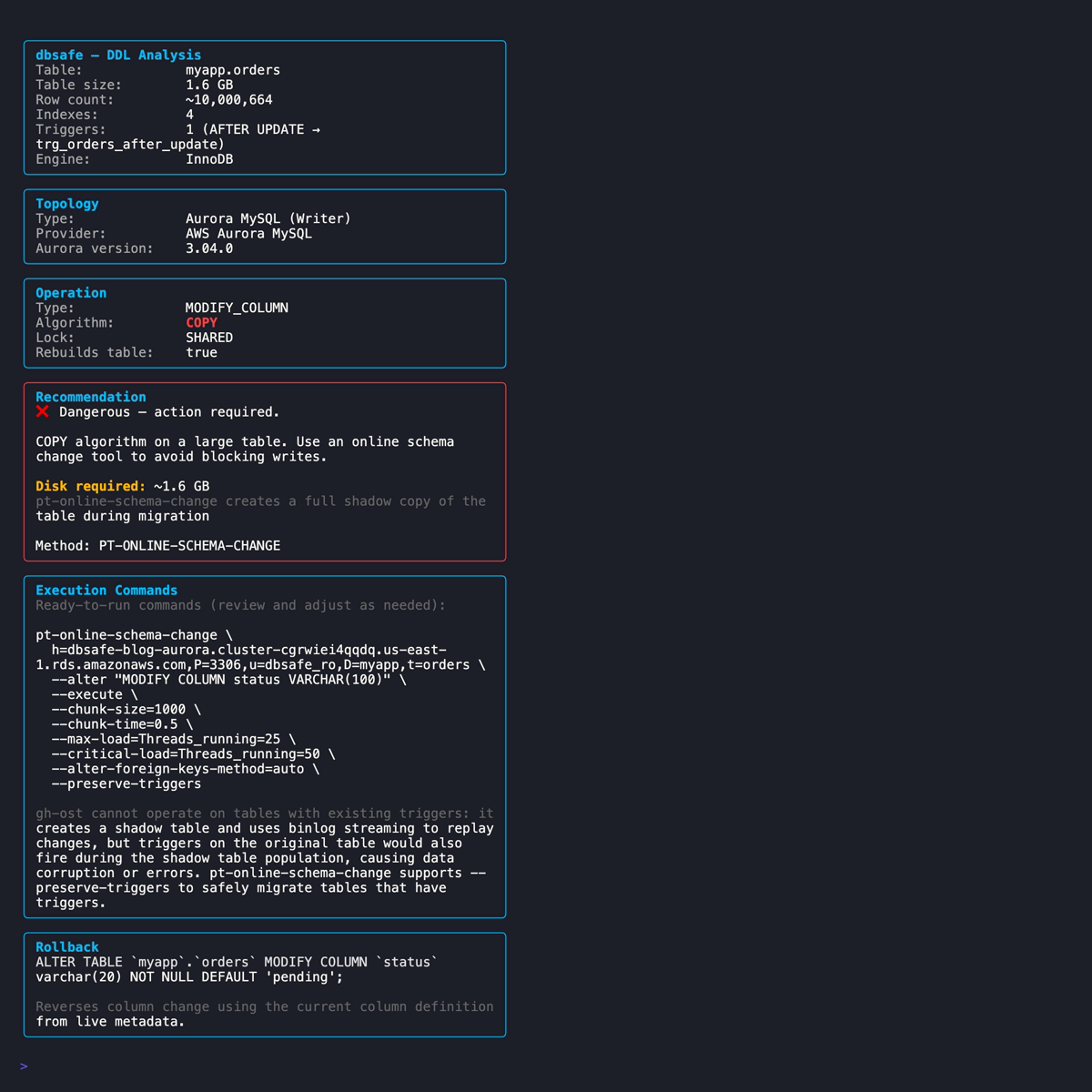
The output shows the Aurora flavor, the effective MySQL version used for algorithm detection, and the topology. For a COPY operation, gh-ost is excluded and pt-osc is recommended, with the reason displayed inline.
Aurora Writer vs Reader Detection
The Aurora MySQL best practices documentation recommends checking the innodb_read_only global variable to determine whether you are connected to a writer or reader instance:
SHOW GLOBAL VARIABLES LIKE 'innodb_read_only';
The variable is OFF on the writer and ON on reader instances. dbsafe queries this variable and reports the topology:
- Aurora Writer: the instance accepting writes. This is where DDL should run.
- Aurora Reader: a read-only instance. DDL executed here will fail.
When dbsafe detects an Aurora Reader, it surfaces a warning: run your schema change on the Writer endpoint instead. This catches a common mistake, connecting to the reader endpoint (the -ro suffix in the DNS name) when you meant to use the cluster endpoint.
# Connecting to the reader endpoint by mistake
DBSAFE_PASSWORD=mypassword dbsafe plan \
  -H my-cluster.cluster-ro-abc123.us-east-1.rds.amazonaws.com \
  -u dbsafe_ro \
  --tls required \
  -d myapp \
  "ALTER TABLE orders ADD COLUMN priority INT"
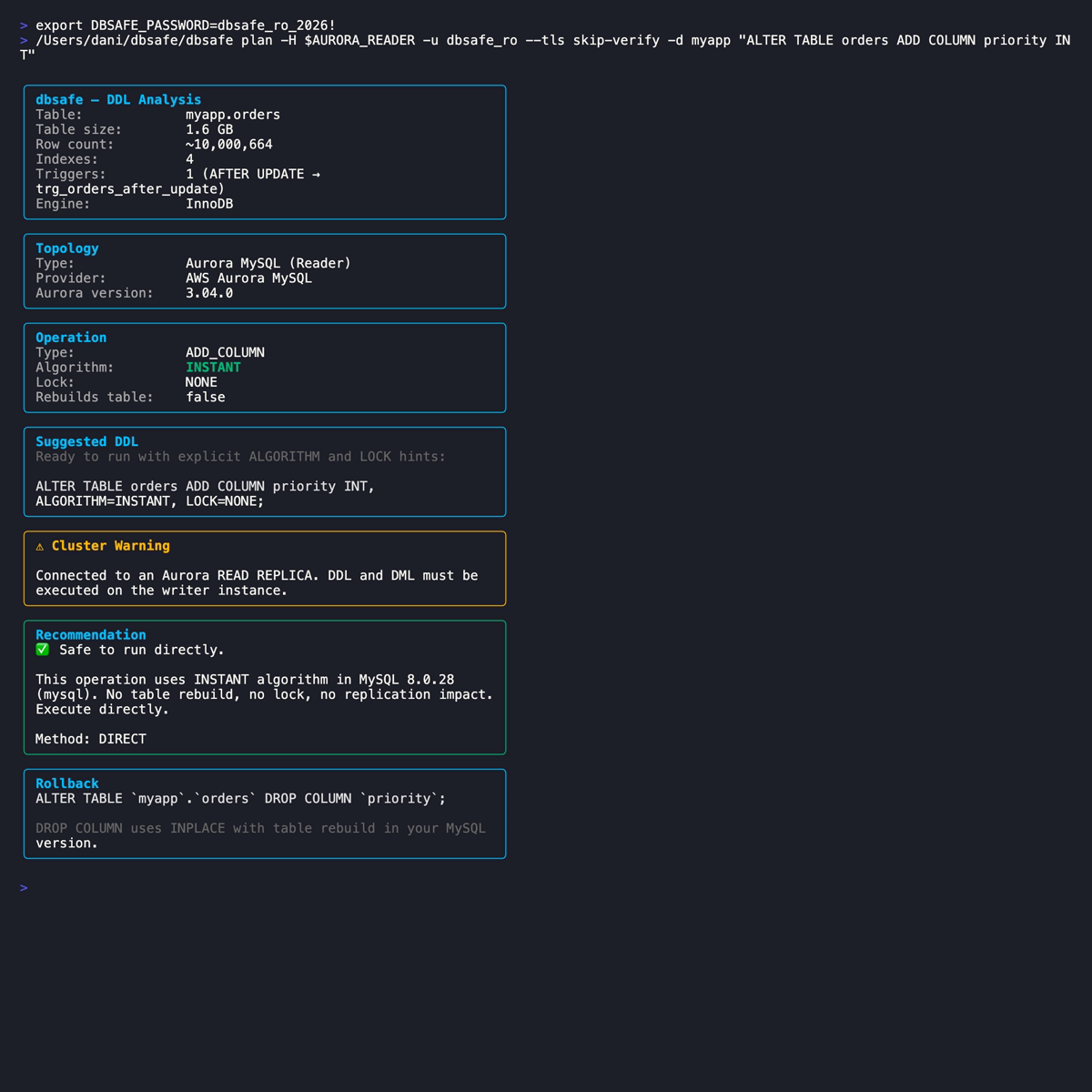
The analysis still runs. You see the algorithm, risk, and table metadata, but the warning makes it clear that executing this DDL here would fail. The Reader endpoint is for SELECT queries and read-only analysis, not schema changes.
Why gh-ost Needs Special Handling on Aurora
gh-ost’s architecture depends on binlog streaming to capture row changes. As the gh-ost docs describe, it “pretends to be a MySQL replica: it connects to the MySQL server and begins requesting for binlog events as though it were a real replication server.” When the shadow table is caught up, it performs a cut-over swap.
On traditional MySQL replication, this works because the binlog is the authoritative source of changes. Replicas apply binlog events to stay in sync. gh-ost taps into the same stream.
On Aurora, the architecture is different. The Aurora overview describes reader instances as connecting “to the same storage volume as the primary DB instance.” The Aurora replication documentation notes that updates “are visible to all Aurora Replicas with minimal replica lag, usually much less than 100 milliseconds after the primary instance has written an update.” This replication happens through the shared storage layer, not through binlog replay.
The gh-ost RDS documentation describes the specific obstacles on Aurora:
-
Binlog filtering: Aurora enables
aurora_enable_repl_bin_log_filteringby default. The gh-ost docs explain the consequence: “gh-ost waits for an entry in the binlog to proceed but this entry will never end up in the binlog because it gets filtered out.” You must set this parameter to0before running gh-ost and restore it to1afterward. -
Master detection: gh-ost detects it is running on the master even when connected to a reader endpoint, because all Aurora instances share the same storage. The workaround requires setting up a separate Aurora cluster configured as a binlog replica, following the Aurora cross-cluster replication documentation.
-
Preflight requirements: the gh-ost RDS docs list a preflight checklist including a secondary cluster, consistent parameters, verified replication status, and backup retention exceeding 1 day.
This is not a simple “add two flags” situation like RDS standalone. It requires provisioning infrastructure (a second Aurora cluster), changing Aurora parameters, and managing cross-cluster replication state.
dbsafe detects aurora-mysql as the flavor and excludes gh-ost from the tool recommendation. pt-osc, which creates DML triggers on the original table and uses standard SQL INSERT/UPDATE/DELETE statements to populate the shadow table (as described in the pt-osc documentation: “the tool creates triggers on the original table to update the corresponding rows in the new table”), operates on Aurora without any special infrastructure because those SQL statements go through Aurora’s storage layer like any other application write.
RDS Standalone Detection
For non-Aurora RDS instances (standard MySQL on RDS), dbsafe performs best-effort detection by checking the basedir system variable. RDS instances have basedir set to a path containing rdsdbbin:
-- On RDS:
SELECT @@basedir;
-- /rdsdbbin/mysql-8.0.45.R3/
When dbsafe detects this pattern, it sets a cloud-managed flag. The implications for schema changes:
- No SSH access: you cannot install or run gh-ost on the RDS host itself. gh-ost must run from an external host with
--allow-on-master. - No SUPER privilege: RDS does not grant
SUPER. The gh-ost requirements document that you can use--assume-rbrto avoid theSTOP SLAVE/START SLAVEoperations that requireSUPER, as long as your replication is already inbinlog_format=ROW. - pt-osc works without extra configuration: it connects as a regular MySQL client and uses DML triggers. No special flags needed for RDS.
Here’s dbsafe plan against an RDS standalone instance:
DBSAFE_PASSWORD=mypassword dbsafe plan \
  -H mydb.abc123.us-east-1.rds.amazonaws.com \
  -u dbsafe_ro \
  --tls required \
  -d myapp \
  "ALTER TABLE orders MODIFY COLUMN status VARCHAR(100)"
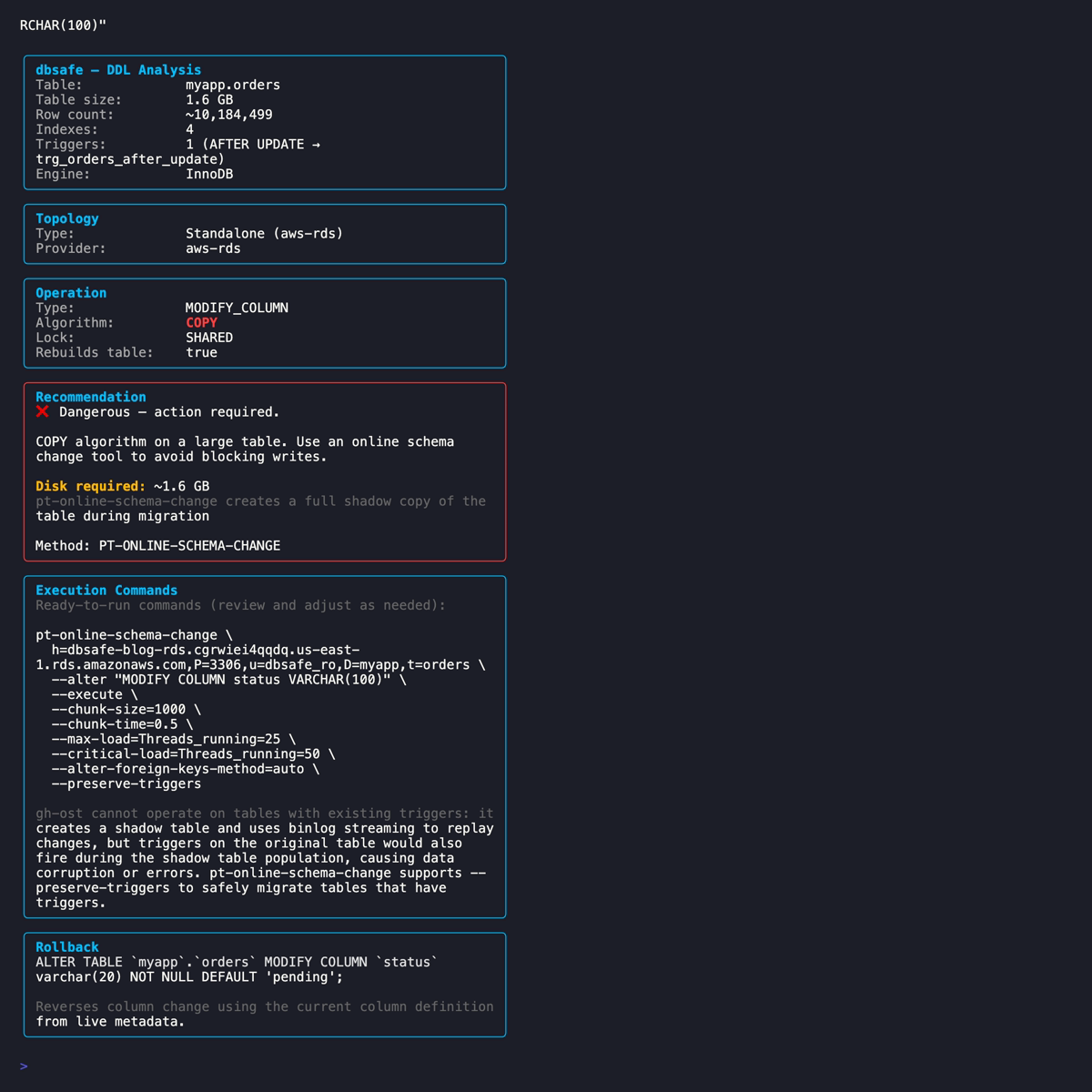
Unlike Aurora, gh-ost is not excluded on RDS standalone. The gh-ost RDS documentation confirms that “gh-ost has been updated to work with Amazon RDS.” dbsafe shows both gh-ost and pt-osc commands, with the gh-ost command including the additional flags needed for RDS.
Configuration Profiles for Cloud
Typing --tls required --tls-ca /path/to/cert.pem on every command is tedious. dbsafe supports configuration profiles in ~/.dbsafe/config.yaml that store connection defaults:
connections:
  aurora-prod:
    host: my-cluster.cluster-abc123.us-east-1.rds.amazonaws.com
    port: 3306
    user: dbsafe_ro
    database: myapp
    tls: required
    tls_ca: /path/to/aws-rds-global-bundle.pem

  rds-staging:
    host: staging.abc123.us-east-1.rds.amazonaws.com
    port: 3306
    user: dbsafe_ro
    database: myapp_staging
    tls: required

defaults:
  format: text
With this config, your daily workflow becomes:
# Analyze against Aurora production (TLS and CA handled by the profile)
DBSAFE_PASSWORD=mypassword dbsafe plan --connection aurora-prod \
  "ALTER TABLE orders ADD COLUMN fulfillment_id VARCHAR(50)"

# Same analysis against RDS staging
DBSAFE_PASSWORD=mypassword dbsafe plan --connection rds-staging \
  "ALTER TABLE orders ADD COLUMN fulfillment_id VARCHAR(50)"
The password is passed via the DBSAFE_PASSWORD environment variable, never stored in the config file. For CI/CD pipelines, pull it from your secrets manager (AWS Secrets Manager, Vault, etc.) into the environment before invoking dbsafe.
Practical Workflow for Cloud Schema Changes
1. Set up a config profile for each environment (production Aurora, staging RDS, etc.) with TLS and CA certificate paths. Do this once.
2. Run dbsafe plan against the production Writer endpoint. Verify the topology shows Aurora Writer (not Reader) and the effective MySQL version matches your expectations.
3. Check the algorithm. INSTANT operations are safe on Aurora. They complete in milliseconds just like on standalone MySQL. The shared storage architecture doesn’t affect metadata-only changes.
4. For COPY operations, use pt-osc. gh-ost is excluded on Aurora because the cross-cluster setup it requires is impractical for routine schema changes. dbsafe generates the pt-osc command pre-populated with your connection parameters. If the table has triggers, --preserve-triggers is included automatically.
5. For RDS standalone COPY operations, choose your tool. Both gh-ost and pt-osc work, but gh-ost requires --allow-on-master and --assume-rbr. dbsafe includes these flags in the generated command. pt-osc works without extra configuration.
6. Never run DDL on a Reader endpoint. dbsafe warns you, but the best practice is to always use the cluster endpoint (which routes to the Writer) rather than a specific instance endpoint.
7. For CI/CD gates, use dbsafe plan --format json with the cloud profile:
RESULT=$(DBSAFE_PASSWORD="$DB_PASSWORD" dbsafe plan \
  --connection aurora-prod \
  --format json \
  "ALTER TABLE orders ADD COLUMN fulfillment_id VARCHAR(50)")

ALGORITHM=$(echo "$RESULT" | jq -r '.algorithm')
if [ "$ALGORITHM" != "INSTANT" ]; then
  echo "Non-INSTANT DDL on Aurora: requires pt-osc migration plan"
  exit 1
fi
Summary
-
TLS is standard for cloud MySQL. dbsafe supports five TLS modes via
--tls, with--tls-cafor custom CA certificate verification against the AWS RDS CA bundle. Userequiredat minimum;customwith the CA bundle for full certificate verification. -
Aurora auto-detection parses the
basedirvariable (which containsmysql_auroraand the Aurora version) to identify the flavor. The effective MySQL version comes from@@version. The Aurora version mapping determines INSTANT DDL eligibility based on the effective MySQL version, not the Aurora release number. -
Aurora Writer/Reader topology is detected via the
innodb_read_onlyvariable, as recommended by AWS. Reader instances get a warning: DDL must run on the Writer. This catches the common mistake of connecting to the-roendpoint. -
gh-ost requires a complex setup on Aurora. The gh-ost RDS documentation documents three obstacles: default binlog filtering that blocks gh-ost events, master detection on all endpoints due to shared storage, and the need for a separate cross-cluster replication target. dbsafe excludes gh-ost on Aurora and recommends pt-osc, which works with standard SQL and requires no special infrastructure.
-
RDS standalone detection is best-effort via the
basedirvariable. gh-ost works on RDS but requires--allow-on-masterand--assume-rbr. dbsafe includes these in the generated command. pt-osc works without extra configuration. -
Configuration profiles in
~/.dbsafe/config.yamlstore host, TLS, and CA paths per environment. Passwords go inDBSAFE_PASSWORD, never in the config file.
References
AWS Documentation:
- Amazon Aurora Overview
- Aurora Replication
- Aurora MySQL Version Mapping
- Aurora MySQL Best Practices
- Using SSL/TLS with RDS
- RDS CA Certificate Bundle
Tools:
- dbsafe, GitHub Repository
- pt-online-schema-change, Percona Toolkit
- gh-ost, GitHub’s Online Schema Migration Tool
- gh-ost Triggerless Design
- gh-ost on RDS and Aurora
- gh-ost Requirements and Limitations
Related Posts:

Daniel Guzman Burgos
Colombia
Related Posts

PostgreSQL Internals for the MySQL DBA
You already know how a database works. This is about how a different database works.
March 31, 2026
The Claude Code Engineer
Ship more, type less
March 08, 2026
Before the Index, Before the Schema: MySQL Makes Three Promises
And understanding them changes how you work
March 03, 2026
Comments