Zero-Downtime Schema Changes with MySQL 8.0 INSTANT DDL
Add and drop columns without rebuilding the table
You need to add a column to a 500-million-row production table. Traditionally, that means hours of disk I/O, replication lag that grows faster than you can drain it, and a maintenance window to tell your users about. With MySQL 8.0 INSTANT DDL, that same change completes in milliseconds — no table rebuild, no row copies, only a brief exclusive metadata lock during the commit phase.
This post covers exactly which operations qualify for INSTANT execution, how MySQL 8.0.29 extended the feature significantly, and how to use dbsafe to verify the algorithm before you ever touch production.
Related: New to dbsafe? The Introducing dbsafe post covers installation, configuration, and the full range of analysis capabilities including DML, topology detection, and CI/CD integration.
The Problem: Schema Changes That Don’t Need to Be Painful
MySQL’s ALTER TABLE has three execution algorithms, and they have very different performance profiles:
-- COPY: New table created, all rows copied, original dropped. Hours on large tables.
ALTER TABLE orders MODIFY COLUMN status VARCHAR(30), ALGORITHM=COPY;

-- INPLACE: Modified in-place without full row copy, but often still rebuilds data on disk.
ALTER TABLE orders ADD INDEX idx_tracking (tracking_number), ALGORITHM=INPLACE;

-- INSTANT: Metadata-only change. No rows touched. Milliseconds regardless of table size.
ALTER TABLE orders ADD COLUMN notes TEXT, ALGORITHM=INSTANT;
The key question is: does this specific operation need to touch data at all? Adding a column with a default of NULL doesn’t require reading or writing a single row — the column simply doesn’t exist yet in the physical data. MySQL can record that fact in the InnoDB data dictionary and be done.
The problem is knowing which operations qualify. That’s where the confusion (and production incidents) happen.
What Is INSTANT DDL?
INSTANT DDL was introduced in MySQL 8.0.12 for trailing ADD COLUMN. Instead of rebuilding the table’s physical storage, MySQL makes a metadata-only change: it updates the InnoDB data dictionary to record the new column definition, without touching any of the actual row data.
The key properties:
- No table rebuild — physical row data is not copied or reorganized
- Brief metadata lock only — reads and writes proceed normally; a brief exclusive metadata lock is taken during the commit phase
- Instant execution — completes in milliseconds regardless of table size (500 rows or 500 million)
- Metadata-only — only the InnoDB data dictionary is modified
MySQL 8.0.29 extended INSTANT DDL significantly, adding support for adding columns at any position (not just trailing) and for dropping columns entirely — operations that previously always required a full rebuild.
How dbsafe Detects INSTANT Operations
dbsafe connects to your MySQL server, checks the version, reads the table’s column structure, and maps your specific ALTER TABLE statement to the algorithm MySQL will use. No guessing, no reading documentation — it tells you directly.
For the examples below, create a self-contained test table. The orders table is a realistic schema with 21 columns, 7 indexes, and a foreign key — the kind of table where DDL decisions actually matter.
CREATE DATABASE IF NOT EXISTS dbsafe_demo;
USE dbsafe_demo;

-- Minimal customers table (required for the FK constraint)
CREATE TABLE customers (
  id INT UNSIGNED PRIMARY KEY AUTO_INCREMENT,
  name VARCHAR(150) NOT NULL,
  email VARCHAR(255) NOT NULL
) ENGINE=InnoDB;

-- Production-like orders table: ~3.9M rows, 21 columns, 7 indexes, 1 FK
CREATE TABLE orders (
  id INT UNSIGNED NOT NULL AUTO_INCREMENT,
  order_number VARCHAR(30) NOT NULL,
  customer_id INT UNSIGNED NOT NULL,
  status VARCHAR(20) NOT NULL DEFAULT 'pending',
  tracking_number VARCHAR(100) DEFAULT NULL,
  subtotal DECIMAL(12,2) NOT NULL DEFAULT '0.00',
  tax_amount DECIMAL(12,2) NOT NULL DEFAULT '0.00',
  shipping_amount DECIMAL(12,2) NOT NULL DEFAULT '0.00',
  total_amount DECIMAL(12,2) NOT NULL DEFAULT '0.00',
  shipping_address_id INT UNSIGNED DEFAULT NULL,
  billing_address_id INT UNSIGNED DEFAULT NULL,
  payment_method VARCHAR(50) DEFAULT NULL,
  payment_status VARCHAR(20) NOT NULL DEFAULT 'unpaid',
  shipped_at DATETIME DEFAULT NULL,
  delivered_at DATETIME DEFAULT NULL,
  cancelled_at DATETIME DEFAULT NULL,
  cancel_reason VARCHAR(255) DEFAULT NULL,
  ip_address VARCHAR(45) DEFAULT NULL,
  user_agent VARCHAR(512) DEFAULT NULL,
  created_at DATETIME NOT NULL DEFAULT CURRENT_TIMESTAMP,
  updated_at DATETIME NOT NULL DEFAULT CURRENT_TIMESTAMP ON UPDATE CURRENT_TIMESTAMP,
  PRIMARY KEY (id),
  UNIQUE KEY uq_order_number (order_number),
  KEY idx_customer_id (customer_id),
  KEY idx_status (status),
  KEY idx_tracking_number (tracking_number),
  KEY idx_payment_status (payment_status),
  KEY idx_created_at (created_at),
  CONSTRAINT fk_orders_customer FOREIGN KEY (customer_id) REFERENCES customers (id)
) ENGINE=InnoDB DEFAULT CHARSET=utf8mb3;
INSTANT ADD COLUMN (MySQL 8.0.12+)
The original INSTANT capability: adding a column at the end of the table (trailing position). This works on any MySQL 8.0.12+ server.
Customer service wants a free-text annotations field on orders. A notes TEXT column has no default value and no NOT NULL constraint — it’s the textbook INSTANT case.
dbsafe plan "ALTER TABLE orders ADD COLUMN notes TEXT"
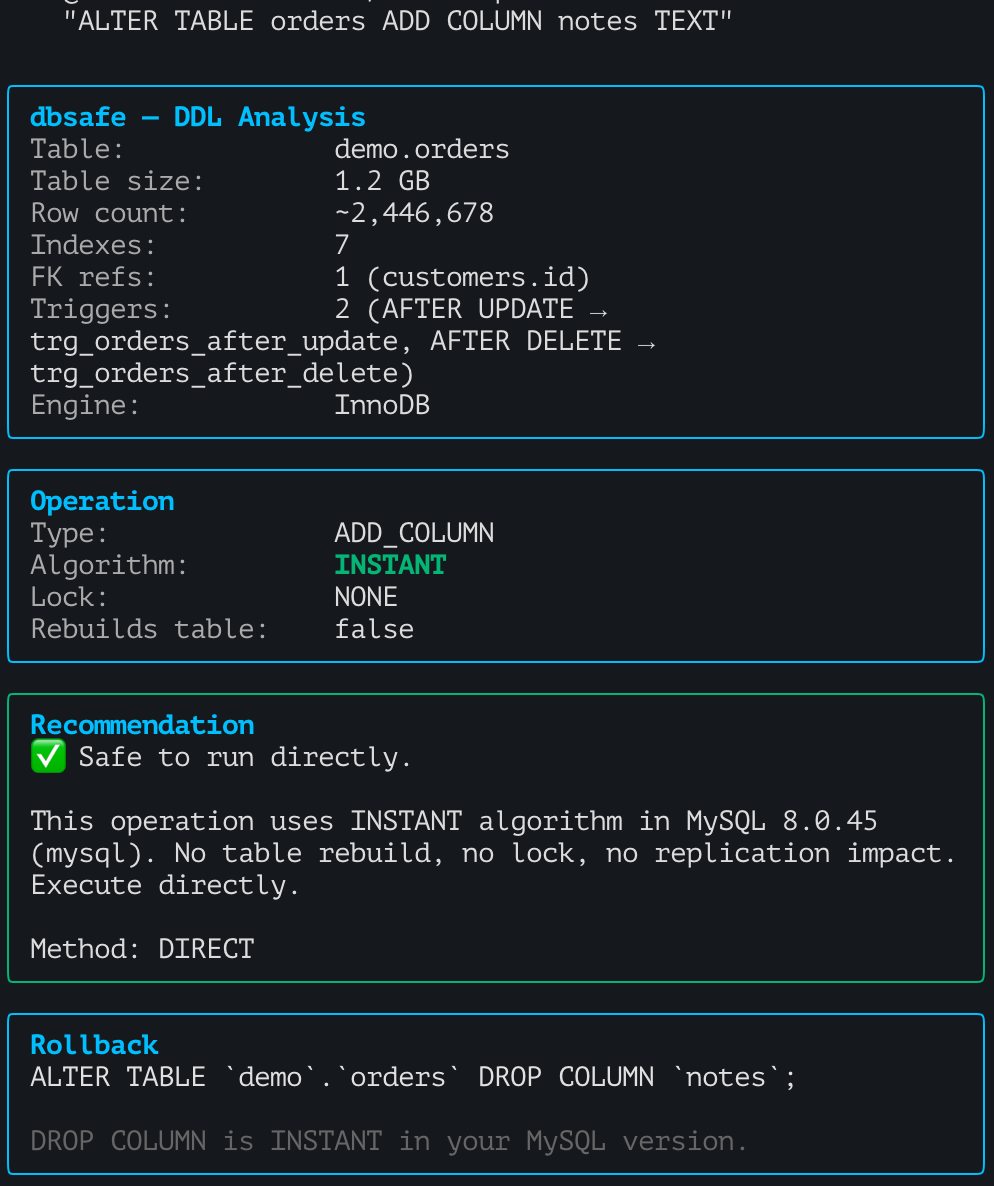
dbsafe reports Algorithm: INSTANT, Locking: NONE, and Risk: SAFE. The analysis also shows that no rows will be touched, and the operation will complete in milliseconds regardless of table size.
This is the most straightforward INSTANT case: a nullable column added at the end, nothing in the physical data needs to change.
INSTANT ADD COLUMN at Any Position (MySQL 8.0.29+)
Before 8.0.29, if you wanted to add a column somewhere other than the last position — using AFTER column_name or FIRST — MySQL fell back to INPLACE, which could still require rebuilding the data on disk.
On 8.0.29+, column position no longer matters:
You want to add a currency VARCHAR(3) column right next to the monetary columns for readability. Using AFTER total_amount places it in the middle of the column list — something that would have forced a rebuild on 8.0.28 and earlier.
dbsafe plan "ALTER TABLE orders ADD COLUMN currency VARCHAR(3) DEFAULT 'USD' AFTER total_amount"
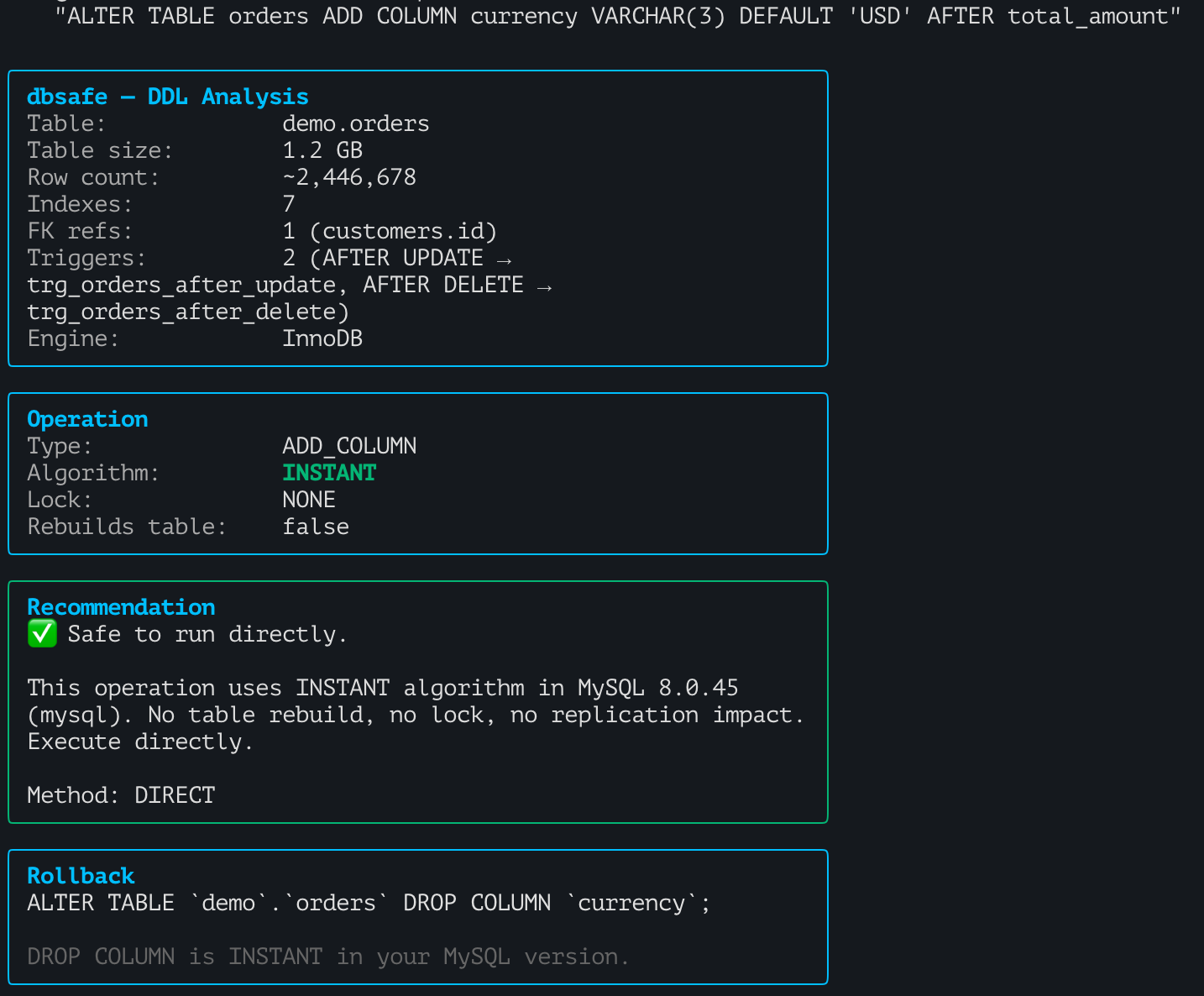
The same statement on MySQL 8.0.28 would produce Algorithm: INPLACE — a full rebuild. On 8.0.29+, it’s INSTANT.
Tip: If your MySQL version is 8.0.28 or earlier,
AFTER column_nameclauses will not be INSTANT. dbsafe detects your server version and shows you exactly what algorithm your server will use — not what the latest version supports.
This version boundary matters in practice. If your staging server is on 8.0.30 but production is on 8.0.27, dbsafe will give you different answers when run against each server. Always run it against the target server.
INSTANT DROP COLUMN (MySQL 8.0.29+)
Before 8.0.29, DROP COLUMN always rebuilt the table. Every row had to be rewritten without that column’s data. On large tables this was as disruptive as any other COPY or INPLACE rebuild.
Starting with 8.0.29, dropping a column is also metadata-only:
The user_agent column was added years ago for fraud detection, but your new fraud system pulls that data from a separate audit log. You want to drop it for GDPR data minimization — a 512-byte VARCHAR across 3.9M rows is meaningful storage.
dbsafe plan "ALTER TABLE orders DROP COLUMN user_agent"
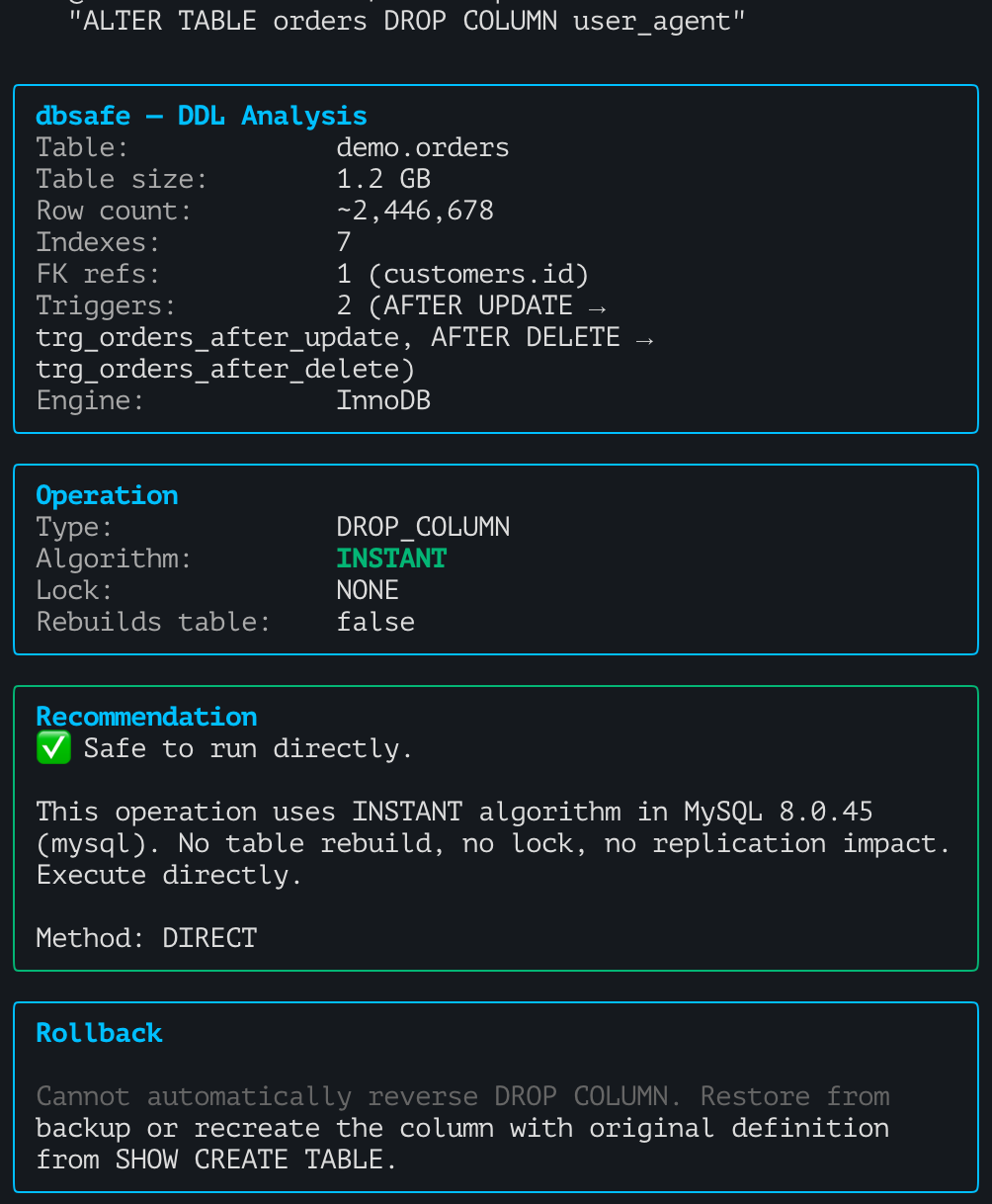
Internally, InnoDB marks the column as dropped in the data dictionary. The physical data remains on disk — the rows still contain the column’s bytes — until the next time a full table rebuild occurs (such as an OPTIMIZE TABLE or a COPY-algorithm ALTER).
Tip: Disk space is not immediately reclaimed after an INSTANT DROP COLUMN. The column’s data stays in the row format on disk until the next rebuild. This is expected behavior — the column is simply invisible to MySQL. If you need to reclaim the space, run
OPTIMIZE TABLE ordersat a maintenance window.
When INSTANT DDL Won’t Work
Not every ALTER TABLE qualifies for INSTANT. Some operations that look simple still require INPLACE or COPY because they actually need to touch or reorganize row data.
Expanding a VARCHAR column is a good example. Whether MySQL can do it in-place depends on whether the change crosses the 255-byte length-prefix boundary: VARCHAR values up to 255 bytes use a 1-byte length prefix, while values of 256 bytes or more use a 2-byte prefix. When the extension stays within the same boundary, MySQL only updates metadata. When it crosses, every row must be rewritten.
The orders table uses utf8mb3 (3 bytes per character), so the byte math matters:
VARCHAR(30)× 3 = 90 bytes → 1-byte length prefixVARCHAR(50)× 3 = 150 bytes → 1-byte length prefixVARCHAR(255)× 3 = 765 bytes → 2-byte length prefix
Extending order_number from VARCHAR(30) to VARCHAR(50) stays within the 1-byte prefix range — both are under 255 bytes. MySQL handles this as an INPLACE, metadata-only change:
dbsafe plan "ALTER TABLE orders MODIFY COLUMN order_number VARCHAR(50)"
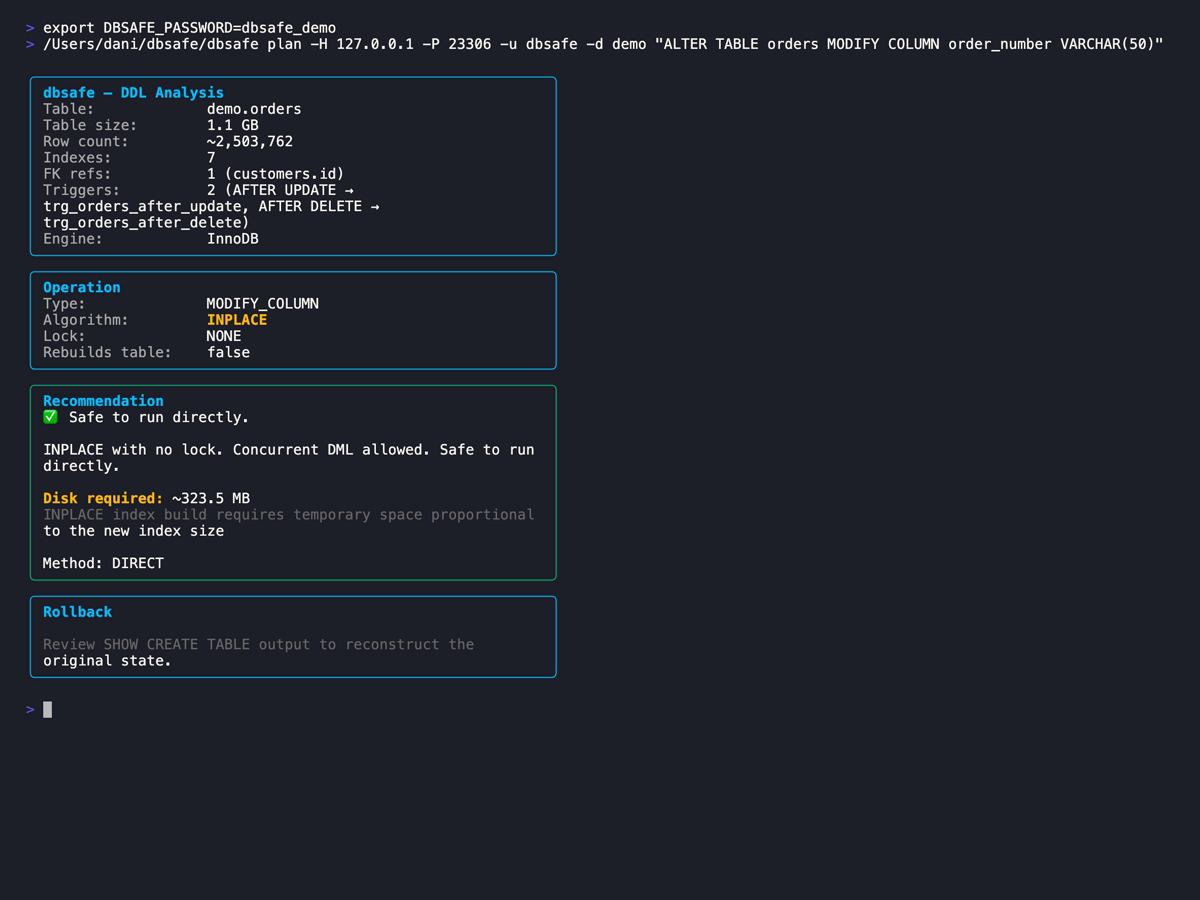
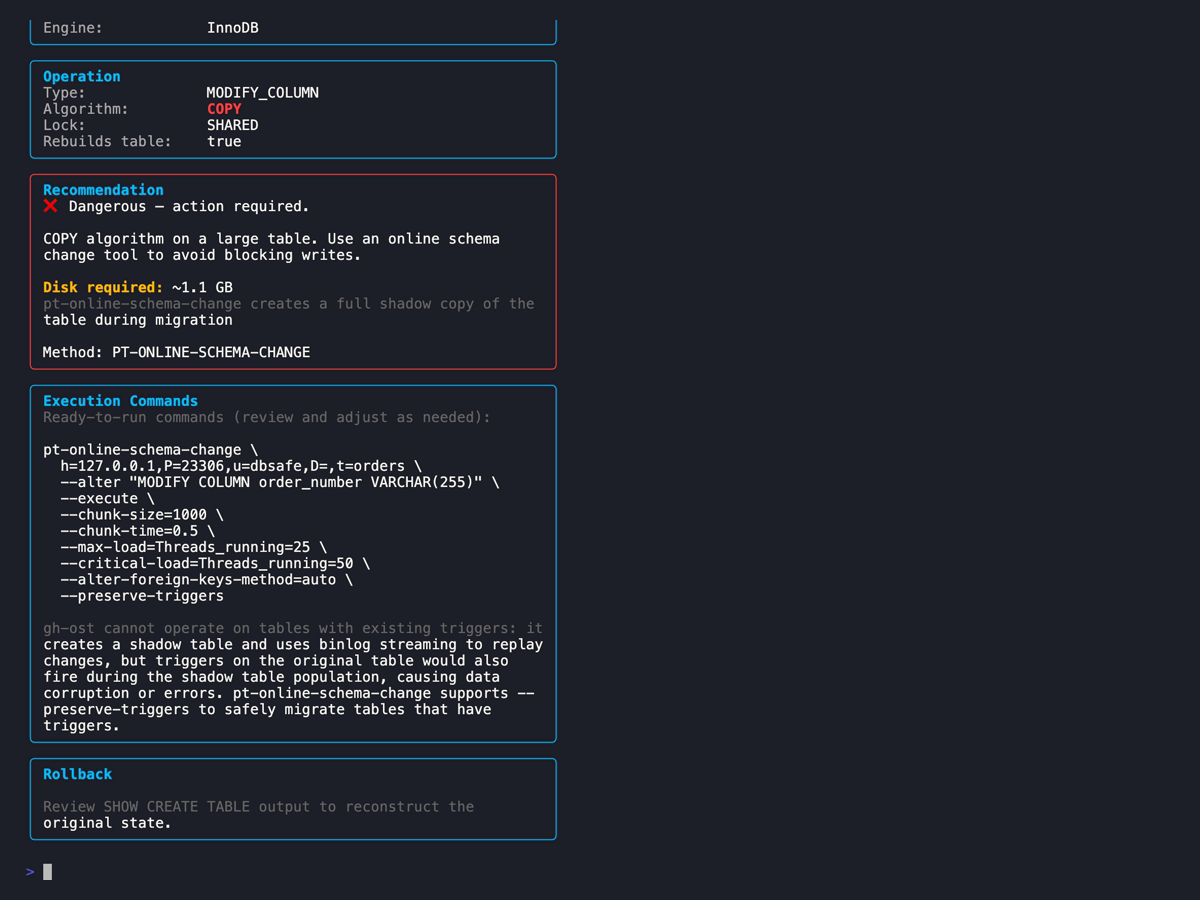
But extending to VARCHAR(255) crosses the boundary — from 90 bytes (1-byte prefix) to 765 bytes (2-byte prefix). MySQL must rewrite every row to change the length prefix, forcing a full COPY rebuild:
dbsafe plan "ALTER TABLE orders MODIFY COLUMN order_number VARCHAR(255)"
Tip: The boundary depends on your character set. With
utf8mb4(4 bytes/char),VARCHAR(64)is already 256 bytes — past the threshold. Withlatin1(1 byte/char), you can extend up toVARCHAR(255)in-place. Always check the byte length, not the character count.
Other common operations that won’t be INSTANT:
- Changing column data type (
INT→BIGINT,VARCHAR→TEXT) → COPY - Adding an index → INPLACE (reads all rows to build the index)
- Changing
NULLtoNOT NULL→ INPLACE or COPY (needs to validate existing rows) - Dropping the primary key without a replacement → COPY (entire clustered index must be rebuilt); adding or replacing a PK → INPLACE (with rebuild, but faster than COPY)
For these operations, you need a different approach: gh-ost, pt-online-schema-change, or a carefully planned maintenance window. The MySQL Online DDL Operations reference has the full matrix of what’s possible.
Version Matrix
| Operation | 8.0.12–8.0.28 | 8.0.29+ / 8.4 LTS |
|---|---|---|
| ADD COLUMN (trailing) | INSTANT | INSTANT |
| ADD COLUMN (AFTER/FIRST) | INPLACE | INSTANT |
| DROP COLUMN | INPLACE (rebuild) | INSTANT |
| RENAME COLUMN | INPLACE | INSTANT |
| Set/drop column default | INSTANT | INSTANT |
| MODIFY COLUMN (type change) | COPY | COPY |
| ADD INDEX | INPLACE | INPLACE |
| Change NULL → NOT NULL | INPLACE/COPY | INPLACE/COPY |
| Drop PRIMARY KEY (no replacement) | COPY | COPY |
| Add/replace PRIMARY KEY | INPLACE (rebuild) | INPLACE (rebuild) |
Practical Workflow
The workflow for any production schema change:
- Write your
ALTER TABLEstatement - Run
dbsafe planagainst your production server (or a replica with production data) - Check the algorithm: INSTANT → proceed; INPLACE/COPY → evaluate alternatives
- If INSTANT: execute directly during business hours, no maintenance window needed
- If INPLACE or COPY: consider gh-ost for zero-downtime, or pt-osc, or schedule a maintenance window
For CI/CD pipelines, dbsafe plan --format json lets you gate deployments on the algorithm:
RESULT=$(dbsafe plan --format json "ALTER TABLE orders ADD COLUMN fulfillment_id INT")

ALGORITHM=$(echo "$RESULT" | jq -r '.algorithm')
RISK=$(echo "$RESULT" | jq -r '.risk')

if [ "$ALGORITHM" != "INSTANT" ] || [ "$RISK" != "SAFE" ]; then
  echo "Schema change is not INSTANT/SAFE — blocking deployment"
  echo "Algorithm: $ALGORITHM, Risk: $RISK"
  exit 1
fi

echo "Schema change is safe to run — proceeding"
mysql -e "ALTER TABLE orders ADD COLUMN fulfillment_id INT"
This pattern catches dangerous migrations before they reach production. The pipeline fails fast, and the developer sees exactly why: the algorithm, the locking, the risk level.
Related: Heavy schema change traffic can cause InnoDB mutex contention. See Contention in MySQL InnoDB for how to detect contention using
SHOW ENGINE INNODB STATUSduring and after schema operations.
For Galera/PXC clusters, the stakes are higher: even an INSTANT DDL in TOI mode blocks all cluster nodes for the duration. dbsafe detects cluster topology and adjusts its risk assessment accordingly. For cluster-specific testing patterns, see How to Test ProxySQL Read/Write Split with sysbench for context on how cluster load behaves during DDL.
Summary
- INSTANT DDL modifies only the InnoDB data dictionary — no row copies, no table rebuild, only a brief exclusive metadata lock during the commit phase, milliseconds regardless of table size.
- MySQL 8.0.12 introduced INSTANT ADD COLUMN for trailing positions only.
- MySQL 8.0.29 extended INSTANT to ADD COLUMN at any position and DROP COLUMN — two of the most common DBA operations.
- Not every ALTER qualifies: data type changes, index additions, and NULL → NOT NULL changes still rebuild.
- Use
dbsafe planbefore every production schema change to confirm the algorithm against your specific MySQL version, table structure, and cluster topology.
Happy schema changes!
References
MySQL Official Documentation:
- ALTER TABLE Statement — MySQL 8.0
- Online DDL Operations — MySQL 8.0
- InnoDB and Online DDL — MySQL 8.0
- InnoDB Data Dictionary — MySQL 8.0
MySQL Blog Posts:
Tools:
- dbsafe — GitHub Repository
- gh-ost — GitHub’s Online Schema Migration Tool
- pt-online-schema-change — Percona Toolkit
Related Posts:

Daniel Guzman Burgos
Colombia
Related Posts

PostgreSQL Internals for the MySQL DBA
You already know how a database works. This is about how a different database works.
March 31, 2026
The Claude Code Engineer
Ship more, type less
March 08, 2026
dbsafe in the Cloud: Safe Schema Changes on AWS Aurora and RDS
TLS connections, Aurora topology detection, and why gh-ost needs extra work here
March 06, 2026
Comments