When MySQL Rebuilds Your Table: Understanding COPY Algorithm DDL
The most dangerous ALTER TABLE operations and how to survive them
You run ALTER TABLE orders MODIFY COLUMN status VARCHAR(100) on your production table. It looks simple — the column already exists, you’re just increasing the size limit. Then you watch the operation spin for 40 minutes while your application throws lock timeout errors and your replica falls an hour behind. MySQL didn’t update the column definition. It built an entirely new copy of the table from scratch.
This is the COPY algorithm: the most disruptive class of ALTER TABLE operations. Unlike the INSTANT DDL operations covered in the previous post, COPY operations touch every row, block DML for the duration, and can take hours on large tables — or days.
This post covers exactly which operations trigger COPY, what physically happens at the InnoDB level, how table size translates to actual risk, and how dbsafe detects the algorithm and generates the mitigation commands you need.
Related: This is the third post in the dbsafe series. Introducing dbsafe covers installation and the full analysis capabilities. Zero-Downtime Schema Changes with INSTANT DDL covers the safe alternative — the metadata-only operations that don’t touch rows at all.
The Problem: ALTER TABLE as a Full Table Rebuild
When MySQL uses the COPY algorithm, it doesn’t modify your table in place. It executes a sequence of physical operations that are equivalent to recreating the table from scratch:
-- What MySQL does internally during a COPY algorithm ALTER TABLE:

-- Step 1: Create a new shadow table with the modified structure
CREATE TABLE orders_new LIKE orders;
ALTER TABLE orders_new MODIFY COLUMN status VARCHAR(100);

-- Step 2: Copy every row from the original to the shadow table
INSERT INTO orders_new SELECT * FROM orders;

-- Step 3: Acquire an exclusive lock and drop the original
LOCK TABLES orders WRITE;
DROP TABLE orders;

-- Step 4: Rename the shadow table to the original name
RENAME TABLE orders_new TO orders;
UNLOCK TABLES;
No rows are skipped. The operation is as expensive as it looks — a full sequential read of every row, a full write into a new table, and a metadata swap under an exclusive lock.
Four risk factors compound this:
- Shared lock — the table is locked for writes (DML) but reads (
SELECT) continue underLOCK=SHAREDduring the copy. Applications cannot insert, update, or delete rows, but queries can still read. - Disk space doubles — the new table must exist alongside the original until the rename. A 200GB table requires 200GB of free disk space during the operation.
- Replication lag — replicas must independently re-execute the full
ALTER TABLE, creating lag proportional to table size and I/O throughput. - Duration scales with row count — 10 million rows takes roughly 10× longer than 1 million rows. There’s no shortcut.
INPLACE operations are better — they often avoid the row-by-row copy — but can still require an internal data rebuild and may hold metadata locks. INSTANT is the only truly lock-free path, and it only applies to a specific set of operations.
The Orders Table
The examples below use the same orders table introduced in the INSTANT DDL post: 21 columns, 7 indexes, and a foreign key to customers. It’s a realistic production schema where algorithm choices have real consequences.
Refer to the INSTANT DDL post for the full CREATE TABLE statement. The column names used in the examples below — status VARCHAR(20), total_amount DECIMAL(12,2), and the mixed-charset string columns — are all part of that schema.
MODIFY COLUMN: Expanding a VARCHAR
The single most common accidental COPY trigger. A product manager asks for longer status values, so you expand status VARCHAR(20) to VARCHAR(100). Same column, same data type, just a bigger limit — surely that’s instant?
dbsafe plan "ALTER TABLE orders MODIFY COLUMN status VARCHAR(100)"
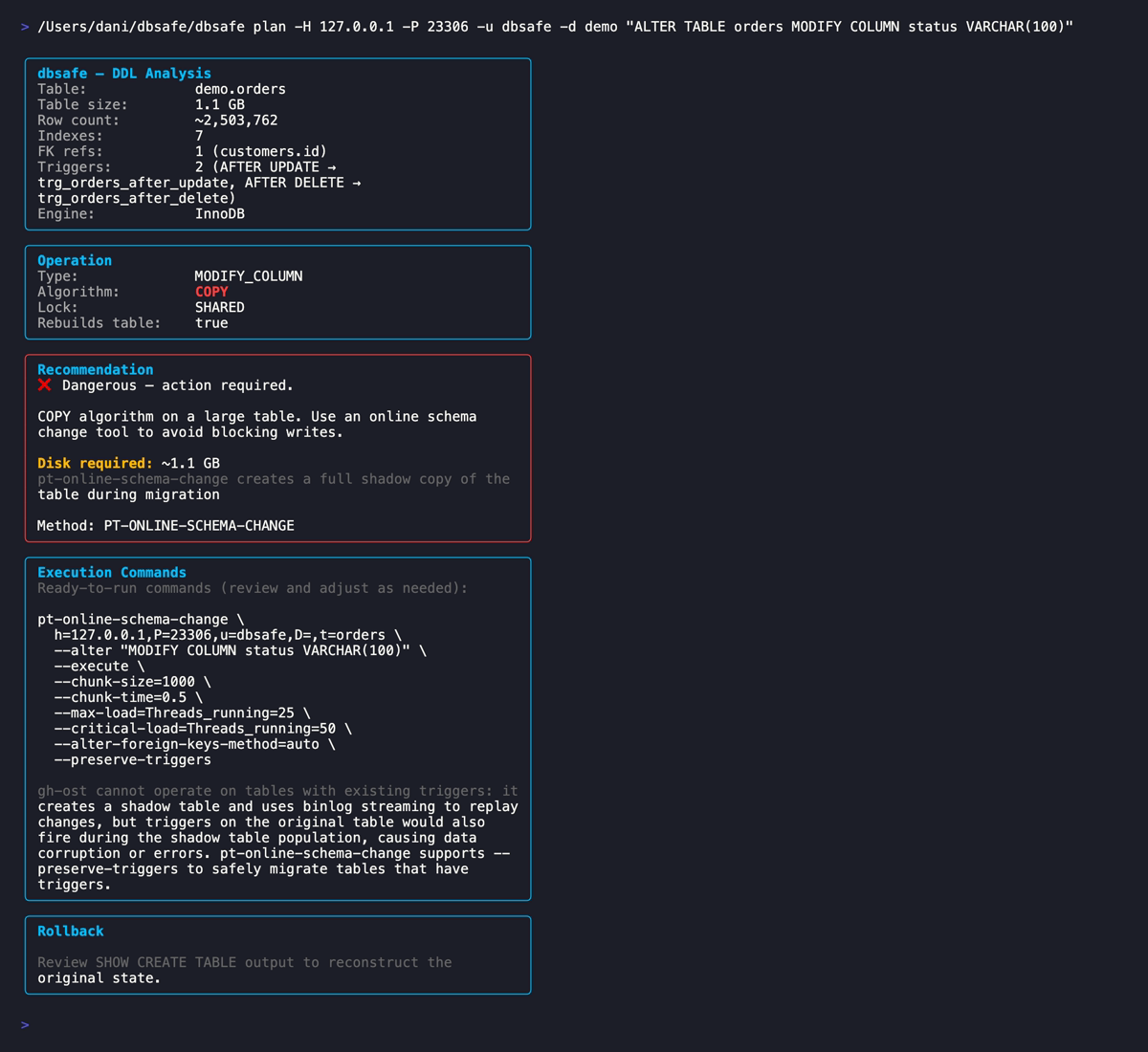
dbsafe reports Algorithm: COPY, Lock: SHARED, and a Dangerous risk assessment. The analysis includes disk space required, an explanation of why gh-ost cannot be used (the table has triggers), and a ready-to-run pt-online-schema-change command with --preserve-triggers.
The reason this triggers COPY comes down to how InnoDB stores variable-length columns. MySQL’s row format encodes the length of each VARCHAR value using 1 or 2 bytes depending on the declared maximum:
- 1-byte length prefix: VARCHAR where
max_chars × bytes_per_char ≤ 255 - 2-byte length prefix: VARCHAR where
max_chars × bytes_per_char > 255
Crossing that 255-byte boundary forces an on-disk format change that requires rewriting every row — triggering COPY.
The charset is the critical variable. With latin1 (1 byte/char), VARCHAR(20) = 20 bytes and VARCHAR(100) = 100 bytes — both stay under 255, so the expansion is INPLACE. With utf8mb4 (up to 4 bytes/char), VARCHAR(20) = 80 bytes and VARCHAR(100) = 400 bytes — crossing the boundary triggers COPY. The orders table uses utf8mb4, which is why dbsafe reports COPY here.
The practical rule: any MODIFY COLUMN that changes size, type, nullability, or charset will use COPY or INPLACE — never INSTANT.
CHANGE COLUMN: Rename with Type Change
CHANGE COLUMN is the syntax for renaming a column while optionally changing its type. You want to rename total_amount to amount and change the precision from DECIMAL(12,2) to DECIMAL(14,4) to track fractional amounts more precisely:
dbsafe plan "ALTER TABLE orders CHANGE COLUMN total_amount amount DECIMAL(14,4)"
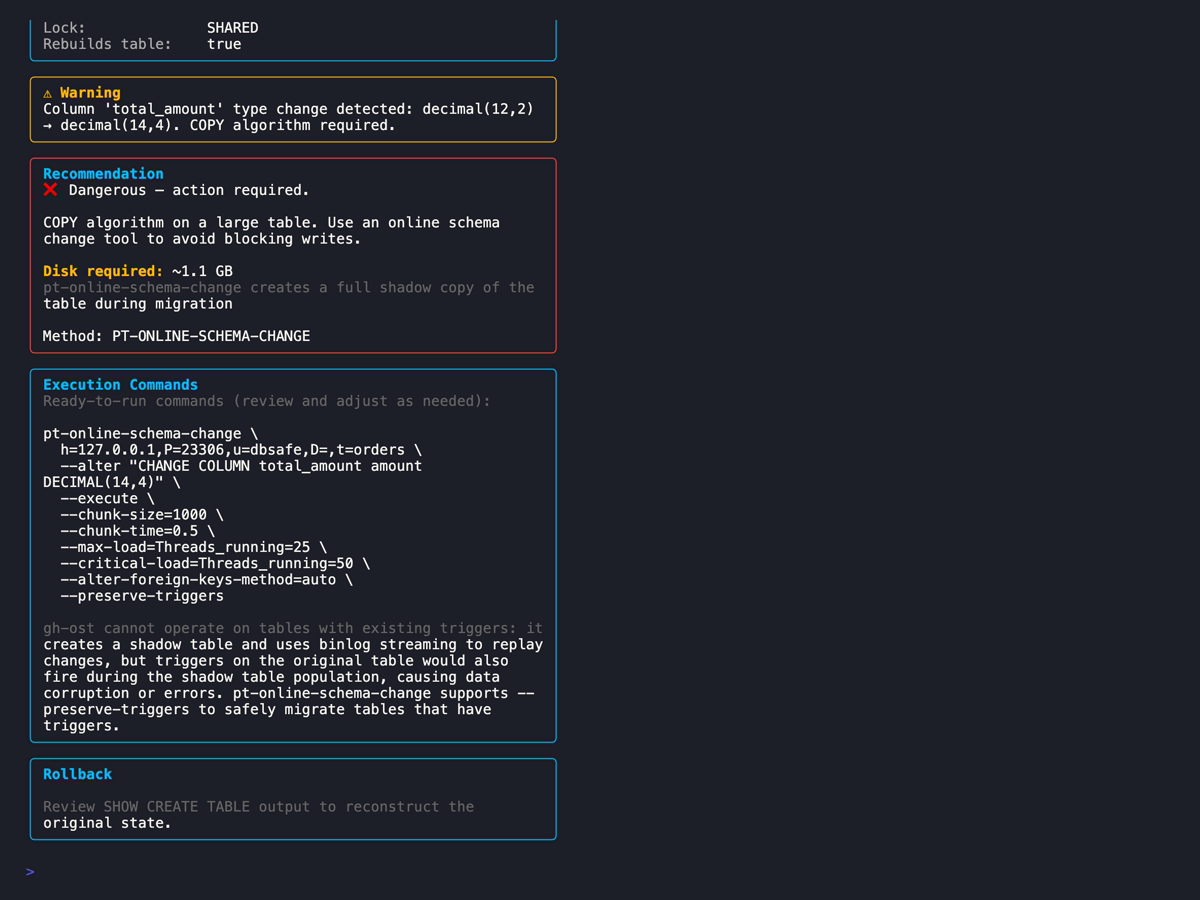
The type change from DECIMAL(12,2) to DECIMAL(14,4) forces COPY. Changing decimal scale (the digits after the decimal point) modifies the internal binary encoding of every stored value — so every row must be rewritten.
All DECIMAL precision changes require ALGORITHM=COPY — there are no INSTANT or INPLACE exceptions like VARCHAR has (MySQL docs). When in doubt, run dbsafe plan against your actual MySQL version before assuming the algorithm.
Tip: If you only need to rename the column — without changing the type — use
RENAME COLUMNinstead ofCHANGE COLUMN.RENAME COLUMNis available from MySQL 8.0.3+; it executes as INSTANT DDL from MySQL 8.0.28+ (INPLACE on earlier 8.0.x versions). Either way: no full row copy, milliseconds on any table size.-- INSTANT on MySQL 8.0.3+ (rename only, no type change) ALTER TABLE orders RENAME COLUMN total_amount TO amount; -- COPY (scale change forces full rebuild) ALTER TABLE orders CHANGE COLUMN total_amount amount DECIMAL(14,4);
Character Set Conversion
Converting a table’s character set triggers a full table rebuild. The algorithm MySQL uses — COPY or INPLACE — depends on whether the table has indexes on character columns. Per WL#11605, collation changes on indexed columns cannot be performed inplace. If any VARCHAR, CHAR, or TEXT column involved in the conversion is part of an index, MySQL falls back to ALGORITHM=COPY.
Even when INPLACE is possible (tables with no indexes on string columns), CONVERT TO CHARACTER SET does not permit concurrent DML — the table is blocked for writes during the entire rebuild. This is a critical distinction from ALTER TABLE ... CHARACTER SET = ... (which only changes the table default without converting existing columns), which does allow concurrent DML under INPLACE.
For the orders table, five indexes reference VARCHAR columns (uq_order_number, idx_status, idx_payment_method, idx_status_created), so this conversion uses COPY. When you run:
dbsafe plan "ALTER TABLE orders CONVERT TO CHARACTER SET utf8mb4 COLLATE utf8mb4_unicode_ci"
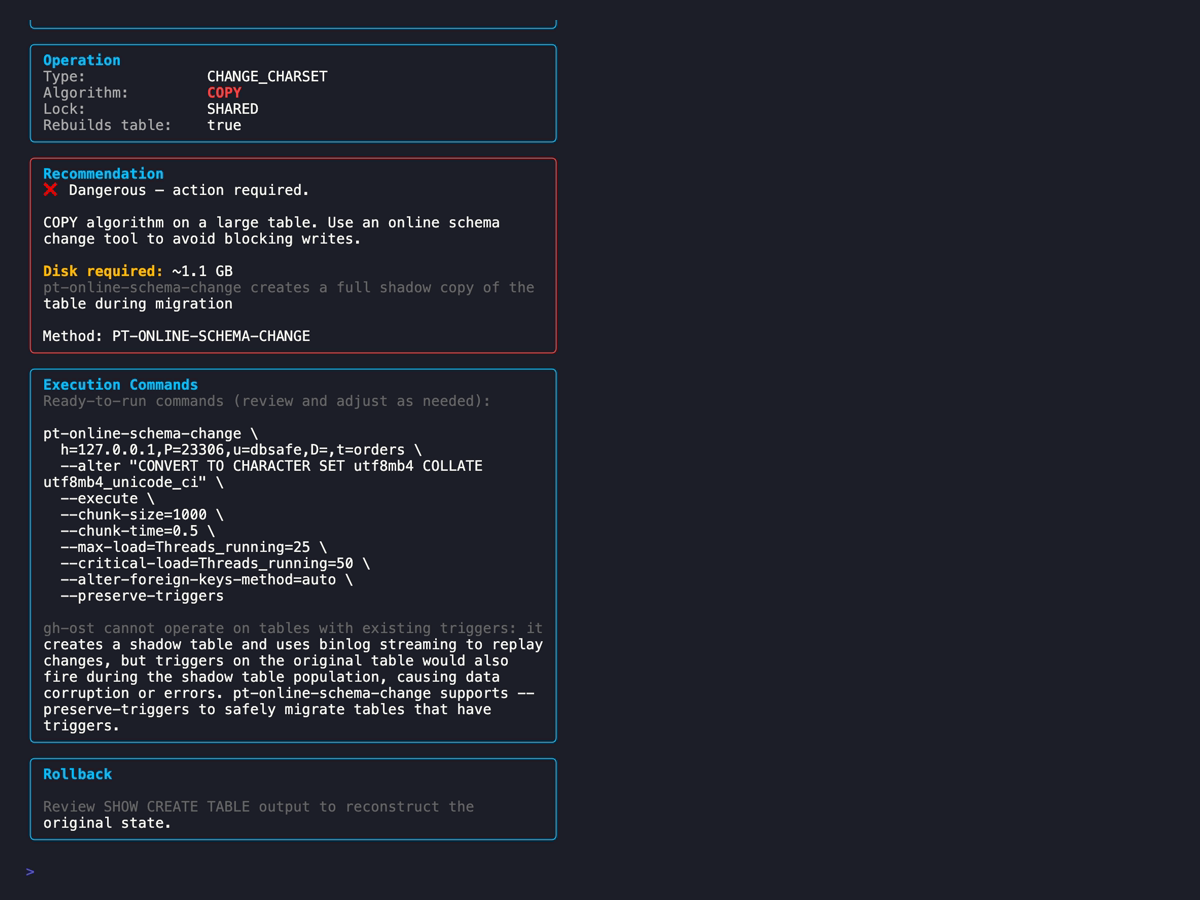
Every string column in the table must be re-encoded. A utf8mb3 character that uses up to 3 bytes may require up to 4 bytes in utf8mb4. While utf8mb3 is a strict subset of utf8mb4 (all valid utf8mb3 byte sequences are valid utf8mb4), the change in maximum bytes-per-character affects column metadata, index key lengths, and the VARCHAR length-prefix calculations — which is why the table must be rebuilt. MySQL cannot predict which characters in your data need expansion, so it has to rewrite every string value in every row.
Two additional risks specific to charset conversions:
- Table size can grow — if your data contains characters above ASCII (accented letters, emojis, non-Latin scripts),
utf8mb4encoding uses more bytes thanlatin1. A 100GB table can become 120GB post-conversion. - Index prefix limits —
utf8mb4uses up to 4 bytes per character. AVARCHAR(255)withutf8mb4requires 1020 bytes for a full-column index, which exceeds InnoDB’s 767-byte index prefix limit on theCOMPACTrow format. If you have indexes on long string columns, the conversion may fail unless you use theDYNAMICorCOMPRESSEDrow format (the default since MySQL 5.7.9).
For large tables with mixed-charset data, dbsafe’s estimated duration and disk space requirements are the numbers to review carefully before scheduling the operation.
When dbsafe Recommends gh-ost or pt-online-schema-change
When dbsafe detects a COPY algorithm operation, it doesn’t just warn you — it generates the exact migration tool command to use. The goal is zero-downtime: instead of taking an exclusive lock while copying rows, gh-ost and pt-osc copy rows in the background while the table remains fully writable.
You already saw the full output in the MODIFY COLUMN screenshot above. The bottom of the dbsafe report includes a complete pt-online-schema-change command with your server’s connection parameters, the table name, and the --alter flag pre-populated with your statement. You copy, review, and run it.
For the orders table in our demo, dbsafe recommended pt-osc — not gh-ost — because orders has two triggers (trg_orders_after_update, trg_orders_after_delete). gh-ost explicitly does not support tables with existing triggers — this is a documented hard limitation. gh-ost is triggerless by design: it captures row changes via binlog streaming rather than installing triggers. But when the source table has its own triggers, those triggers fire during gh-ost’s row copy and can produce unexpected side effects (double-firing, inconsistent data). gh-ost refuses to run in this case. dbsafe detects triggers via information_schema.TRIGGERS and switches the recommendation to pt-osc automatically.
The full decision matrix for which tool dbsafe recommends:
-
Table has triggers → pt-online-schema-change — gh-ost cannot operate on tables with existing triggers (known limitation). dbsafe checks for triggers first and routes to pt-osc, which handles triggers correctly via
--preserve-triggers. -
Galera/PXC cluster → pt-online-schema-change — gh-ost has known incompatibilities with Galera/PXC due to differences in how DDL and locking interact with writeset replication. pt-osc uses standard SQL DML that replicates correctly through wsrep. dbsafe detects the cluster topology and switches the recommendation automatically.
-
Amazon Aurora → pt-online-schema-change — gh-ost requires additional configuration and workarounds to run against Aurora (
--allow-on-master, binary log configuration). pt-osc works correctly without extra configuration. -
Standalone MySQL or async replication, no triggers → gh-ost (default) — gh-ost uses binlog streaming rather than triggers, making it pausable, throttleable, and safer for high-write environments. It’s the preferred tool when no triggers or cluster topology prevents it.
A future post will cover the full decision matrix for gh-ost vs pt-osc in detail, including throttling configuration, chunk sizing, and monitoring during execution.
Risk Assessment: Table Size Matters
dbsafe factors table size into its risk assessment and estimated duration. The rough sizing guide:
| Table Size | Estimated Duration | Risk Level | Recommendation |
|---|---|---|---|
| < 100 MB | Seconds | Moderate | Native MySQL acceptable with caution |
| 100 MB – 1 GB | Minutes | High | Use gh-ost or pt-osc, avoid peak hours |
| 1 GB – 10 GB | Tens of minutes | Dangerous | gh-ost or pt-osc required |
| 10 GB – 100 GB | Hours | Critical | gh-ost or pt-osc, staged rollout, monitoring |
| > 100 GB | Many hours | Critical | Full migration plan, staging validation, on-call |
These estimates assume a reasonably loaded server with local SSD storage. NFS-mounted data directories, high concurrent write load, and row formats with large BLOBs all increase duration significantly. A < 100 MB table under heavy write load can be more disruptive than a 1 GB table on a quiet replica.
dbsafe’s duration estimate comes from the table’s current row count and average row size (read from information_schema.TABLES), so it reflects your actual data, not a generic estimate.
Practical Workflow for COPY Operations
The workflow when you suspect or confirm a COPY operation:
- Write your
ALTER TABLEstatement — start with what you actually need - Run
dbsafe planagainst your production server or a replica with production-scale data - Confirm the algorithm — if COPY, do not execute natively on a large table
- Check the table size — dbsafe shows current size; compare against the sizing guide above
- Review the generated command — gh-ost or pt-osc, pre-populated by dbsafe
- Test on staging — run the full migration tool command on a staging server with a production-size dataset
- Execute with gh-ost or pt-osc — during a lower-traffic window, with throttling configured
- Verify after completion — check row counts, spot-check data, confirm replication is caught up
Related: Heavy DDL operations — even when run via gh-ost — can cause InnoDB mutex and semaphore contention. See Contention in MySQL InnoDB for how to detect contention using
SHOW ENGINE INNODB STATUSduring and after schema operations. TheSEMAPHORESsection will show elevated waits if the operation is stressing the buffer pool or lock subsystem.
For automated pipelines, dbsafe plan --format json lets you extract the algorithm and generated command programmatically. If the algorithm is not INSTANT, the pipeline can halt and present the migration command for human review before any production change proceeds.
Summary
- COPY algorithm means a full table duplicate — MySQL creates a new table, copies every row, then swaps. Disk space doubles temporarily. DML (writes) is blocked throughout under
LOCK=SHARED, but reads can continue. - The most common COPY triggers are
MODIFY COLUMN(any size or type change that crosses the VARCHAR length-prefix boundary or changes binary encoding),CHANGE COLUMNwith a type change, and dropping a primary key without replacement. Charset conversions (CONVERT TO CHARACTER SET) use COPY when the table has indexes on character columns — which is the common case for production tables. Even when INPLACE is possible, concurrent DML is not permitted. In either case, the physical work is a full row-by-row rebuild. - Risk scales with table size — a COPY on a 500GB table takes hours; a COPY on a 50MB table takes seconds. dbsafe estimates duration from your actual row count and row size.
- dbsafe detects the algorithm and generates the mitigation command — gh-ost for standalone and async replication, pt-osc for triggered tables, Galera/PXC clusters, and Aurora.
- Always run
dbsafe planbefore any production schema change — especially for operations that look innocent, like expanding a VARCHAR or renaming a column with a type change.
Happy (safe) schema changes!
References
MySQL Official Documentation:
- ALTER TABLE Statement — MySQL 8.0
- Online DDL Operations — MySQL 8.0
- InnoDB and Online DDL — MySQL 8.0
- InnoDB Row Formats — MySQL 8.0
- Character Set Conversion — MySQL 8.0
- RENAME COLUMN — MySQL 8.0
Tools:
- dbsafe — GitHub Repository
- gh-ost — GitHub’s Online Schema Migration Tool
- gh-ost Triggerless Design
- pt-online-schema-change — Percona Toolkit
Related Posts:
Daniel Guzman Burgos
Colombia
Related Posts

PostgreSQL Internals for the MySQL DBA
You already know how a database works. This is about how a different database works.
March 31, 2026
The Claude Code Engineer
Ship more, type less
March 08, 2026
dbsafe in the Cloud: Safe Schema Changes on AWS Aurora and RDS
TLS connections, Aurora topology detection, and why gh-ost needs extra work here
March 06, 2026
Comments